Off the Top: Hardware Entries

20052010201520202025

Showing posts: 1-15 of 26 total posts


3 September 2026

A Vision Pro Perspective

I have used many different VR headsets at hackathons and studio labs, but the visual quality was less than desirable. Reading in them was far less than optimal. I had found the 3D immersive capabilities somewhat interesting for training physical tasks and heightening awareness skills. But, the quality of the headsets’ visual quality and rough interaction models were large hurdles to overcome.

A couple years back (or so) I had tried the Apple Vision Pro out of curiosity at an Apple Store, after its launch and impressive walkthroughs. I was blown away with the visual quality as it was generations better than other options out there. But, the interactions with the apps and interface were incredibly simple to understand and became very quickly intuitive.

The Apple Store demo really piqued my interest. I could see its upsides for consumption. But, I could also see the potential for using it for remote work and interaction environments. That work potential became a large curiosity. The price of the Apple Vision Pro was a huge hurdle to go digging for the sake of curiosity. But, when Apple added the capability for a virtual monitor for your Mac with wide and ultrawide options, that started nudging the viability for curiosity. But, the price was still a bit too steep. I started looking at used Vision Pro models and prices were around $1k off new purchase prices. The friction there was knowing how to find one in good shape. I asked in an Apple forum I am part of how to purchase a used Vision Pro and someone in the forum had one they were thinking about selling. We chatted and worked out how to meet and purchase the device.

I figured if the two big things I had interest in it was worth the investment in the used AVP: 1) Viability for virtual meetings; 2) Virtual monitor. If it didn’t meet my interest or curiosity waned, I figured I could sell it on and get close to what I paid.

Before the Two Use Cases I Care About

The questions many ask are around:

Quality?
The quality of the hardware, visual displays, and interactions are seriously impressive. Opening web pages and reading ebooks is really nice clean and really impressive. There are no jaggies nor glitching.
Does it feel heavy?
I picked up the Annapro 2 add-on that is a brace that is padded and used at the top of the forehead area that takes the weight off your face and balances it much better. I regularly will have 2 to 5 hour sessions with the Vision Pro on and it doesn’t feel heavy nor cause neck strain for me.
How much do you use it?
I used it at least once a week, but many weeks around three times a week for tasks, virtual monitor use (more on this below), and some content consumption.
App availability?
There are apps for most things I do (many of my regular apps are available as visionOS native apps, and most other are available as iPad apps that are made Vision Pro capable), but not all apps that I really want are available as native visionOS apps. Two of the apps I really want on the device are the Drafts app (this is how I capture and surface quick notes across devices, not having it natively is a pain) and iA Writer as the Vision Pro a great device for focussed work (the input side is something). Having native Obsidian would help a lot as well, but that is more difficult as it is an Electron-based app.
I really want data visualization apps for larger data sets or data with a lot of complications, so that scaling the interface allows for better examination and interrogation of the data.
I really want Freeform as a solid whiteboard option, but it is so close and yet so far.
Isn’t it mostly a content consumption device?
The consumption capabilities of the Vision Pro are amazing, but for a consumption primary device the price is a bit much. The immersive environments to work in or consume content in are insanely well done. The immersive video content is stunning to say the least. Watching movies or other video content is a really good experience in 3D or regular viewing.

Curiosity Around Virtual Meetings

The Apple marketing pitched the Vision Pro as a good virtual interaction device. It used personas that were your face and hands. But, the big question I had around this was the ability to have meetings with colleagues that normally require hopping on a train or plane to get in the same room for 2 to 4 hours, or a couple days. That in-person interaction around plans in documents, presentations, spreadsheets, and whiteboards with a few people seems really viable. I really wanted to test it out that interpersonal interaction capability.

People that work together are most often rather distributed these days and there is no getting around that and travel isn’t cheap. But, if you can shift two or three fly-in meetings to Vision Pro you have basically paid for the device. But, if you can have more solid interactive meetings between the fly-in meetings that have better value than Zoom or Teams or even augment them with greater interaction and fidelity, that is a great win as well.

When I picked up my used Vision Pro it was still the first version of visionOS. The personas were decent and far better than other VR / AR providers, but could be better. Within a few months a major update was made and the personas really became good. Within a few minutes you forget you are interacting with a persona, and it feels normal with great facial gestures and hand and shoulders captured too.

Trying the interaction around documents and presentations with friends has been incredibly good. Once you open a document the person(s) you are interacting with shift from in front of you to arranged next to you and can point and touch what is being shared. This was and is incredibly good. I’ve done 2 and 3 hour sessions in the virtual meeting sessions and for most things it is really good where showing, talking about, interacting in shared documents, and editing is quite good.

The two limitations of this model are: 1) SharePlay is used for the interactions so it is capped to 5 people in the virtual interactive environment at a time; 2) The whiteboard with Apple’s Freeform (Apple launches Freeform) is their virtual whiteboard, which is similar to a Miro or Mural. The 5 person limitation isn’t bad and it is fine for many fly-in meeting needs for planning and check-ins, but 10 for in the same space and then have 5 person breakout sessions with much better interaction would really go a long way. Freeform in Vision Pro really need an input device and the best option is an iPad, which is rather good, but really needs a few more improvements. The iPad Pro with the Pencil Pro and the virtual shadow and the shadow for bevelled orientation seems like it was designed with Vision Pro in mind. But there needs to be some sort of pass-through to take some of the friction out of this. You can get rather proficient with a little time using the iPad Pro as the Freeform interface to do detailed work. The dedicated virtual pens lose fidelity and detail and from my perspective are a poor option.

A great advantage of using the Vision Pro virtual meetings is the focus of participants. In regular meetings most participants aren’t focussed on the matter at hand. For fly in meeting with distracted participants that is a very expensive problem. The distractions are normal and viable to keep on top of projects and problems that happen no matter if a meeting is happening or note. The advantage of Vision Pro is it puts the meeting front and center and the interactions with others in the shared virtual meeting, which is an amazingly strong value.

For virtual meetings this is a good option, but almost there and there needs to be some focus on what is needed to get there. There have been small steps, but the steps need to be more frequent and a bit larger. The other downside is a network effect problem (network effect as the converse), as there aren’t enough people who have Vision Pro devices to have ad hoc meetings with partners and clients at the drop of a hat. I have a few friends whom I interact with that I can test the advances around Share Play and different shared interaction capabilities.

Virtual Monitor

The other added value functionality I was curious about was the Virtual Monitor for Macs. I use the Vision Pro as a virtual monitor for my MacBook Pro quite a bit. The ability to use regular width screen (roughly equivalent to my 16 inch Mac Book Pro or a bit bigger), wide screen (about two screen widths), and ultra wide that wraps (about 3 screens) is really impressive. I most often use the ultrawide option when I need 3 or 4 apps open to have a screen I’m working in, one screen size for my notes, and one or two for reference.

There are two upsides for the Virtual Monitor mode. One is the ability to have Vision Pro apps open around the monitor mode as sticky notes, MindNote mindmap app, Safari floating with a page open, OmniOutliner lists open, and Apple Music. When I’m at my desk I have an external monitor to the left of my laptop stand, so I have two screens. The real life two screen setup causes more neck strain than the wide or ultrawide screen (by a long shot) and that is including the weight of the Vision Pro headset.

The quality of the pass through was a big question. The quality isn’t the same as the amazing screen on the MacBook Pro, but it is two 4k monitors with one in front of each eye. It sometimes is a little less than optimal, but if I move the virtual monitor either closer or farther back it gets to a sweet spot for really nice clarity. I don’t use the virtual monitor or ultra detail work or color precision work as the MacBook Pro screen is superior (similar for my 4k external monitor on my desk).

Two things I really enjoy doing in the virtual monitor are working on system mappings as I can go really wide and tackle and working in Freeform as a virtual whiteboard (it would be so much better were Freeform inputs much better in Vision Pro in its native app). I use Canvas in Obsidian for some capturing of systems and models, I also use OmniGraffle (the Mac version, as there isn’t an Vision Pro version yet, nor a working version of the iPad app for OmniGraffle 8 - I’m moved most of my OmniGraffle work into the beta of version 8 over the last year). In OmniGraffle I don’t use paper size, as I only use it for digital work, so I can go quite wide and tall.

One other advantage of the Virtual Monitor is that for the price of three good 4k monitors the Vision Pro is around the same price.

Vision Pro Impression Today

I still have the Vision Pro and I still get a lot of value from the device and regular use. There are some weeks where much of my use in the device is consumption, but pure consumption weeks are fairly rare.

One of my favorite uses is to put it on and just focus on work and tasks. Dropping into an immersive environment or the TGV app (a virtual TGV train trip that can provide a train focussed environment through the developer capabilities). I find trains are a great focus environment to get things done for me and this app works really well to resemble that.

I am really happy I picked up the Vision Pro, particularly used, as the price point felt it was quite on target. I really would love for Apple to take larger and more progressive steps. There are times I don’t know that Apple understands the full impact and focus of all the use cases, but I’ve virtually attended a few of the Vision Pro Developer full-day series and Apple is covering a lot of ground and covers many of the use cases well. I look forward to what is coming down the road.
5 June 2026

The Poetry of Time

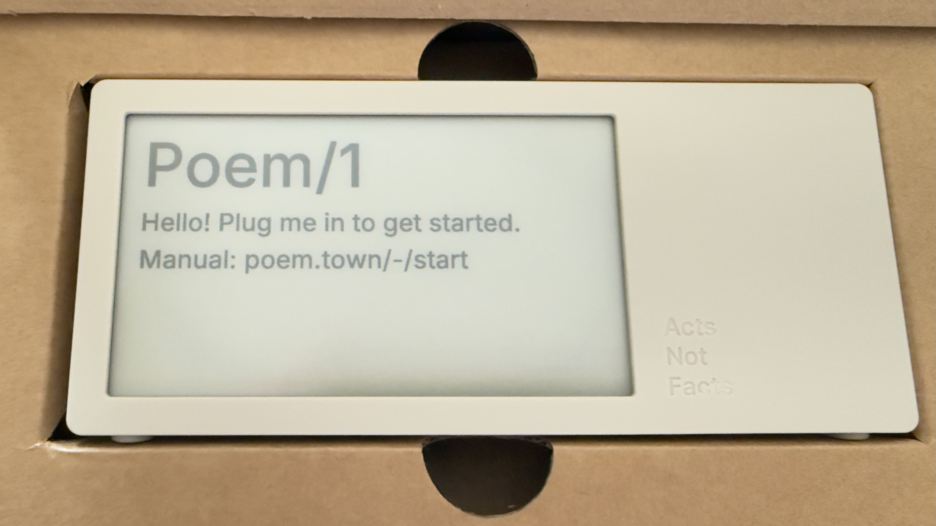
Today a package arrived that I’ve been deeply looking forward to. Part of the anticipation is the pure utter whimsy of it, part is it was a Kickstarter project that involved hardware (read hardware is hard when manufacturing is involved), and knowing the creator and watching all the steps along the way I was happy to see it and touch it. This is the Poem/1.

Poem clock in the box

Most of all, this device is giving me a lot of enjoyment and, well, glee.

The Poem/1 Arrived

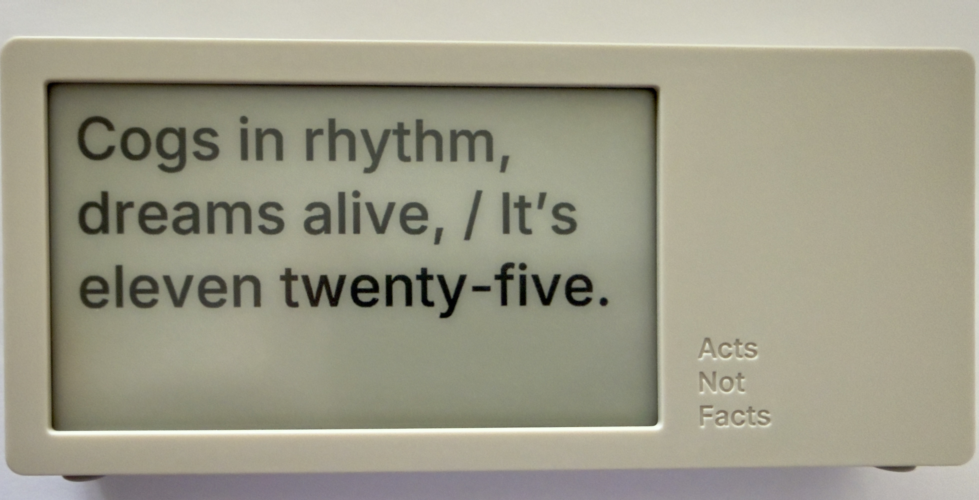
This poetry clock in the few hours I have had it running, with its e-ink display that updates every minute with a new poem for the time, which is / was generated by AI. Some of the poems are, well unique, and others are wonderful, but they can be favorited with the one button on the device.

The one button does a lot of work. It can be used to favorite a poem. There is a site with a dashboard for your device where you can push it notes you write to display, but to clear the note and get back to the clock you use the one button. There is a sleep mode with a screen saver and to clear that, you use the one button.

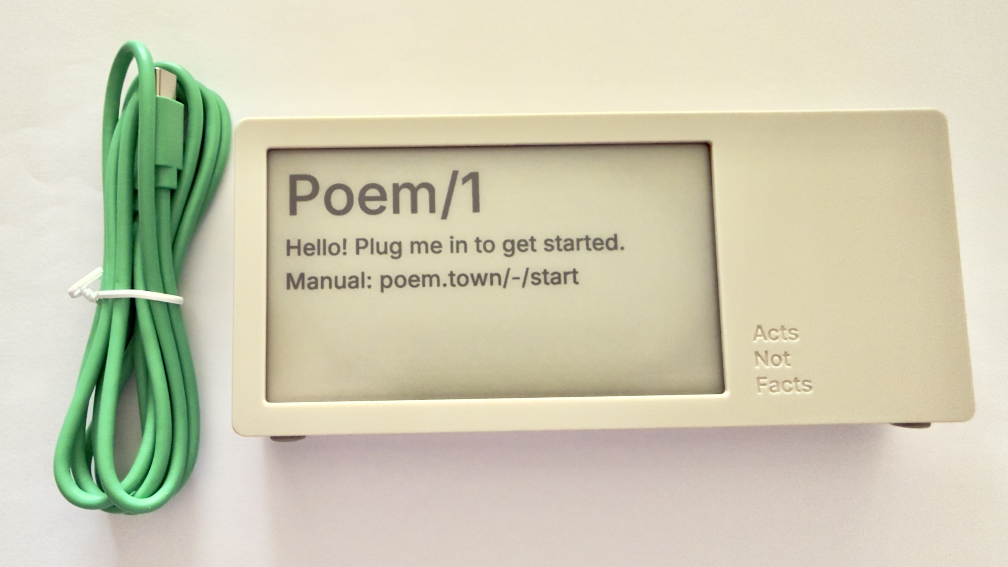
Poem clock and USB-C cable

The Poem/1 also has one USB-C cable. There is no manual in the box. Everything you need is the new Poem/1 device, the USB-C cable, and the e-ink screen tells you the rest.

After plugging it in you get a screen with some technical details and a QR code and using your phone with the QR code it then walks you through everything from easily connecting it to your WiFi (if printers could do this…), then make a selection or two and you have poetry time. There is also a dashboard website and the setup to your device is incredibly easy as is the setting up the account on that site.

photo of poem clock displaying Cogs in rhythm, dreams alife, It's Eleven twentry-five.'

The Journey of Poem/1

About 3 years ago Matt Webb blogged about an idea he had about an AI poetry clock, My new job is AI sommelier and I detect the bouquet of progress (Interconnected). This soon got connected to an e-ink device and Matt was on his way.

Matt setup a Kickstarter, which I happily backed. It wasn’t that I was overly keen with the AI bits (I’ve been working with AI/ML going back to 2008 and stayed current and it is a thing that I treated, like most everything else, as a tool). But I enjoyed the process of little printer – BERG and its outcome from afar. Having watched Little Printer’s journey of toil to come to life from Berg London (Matt and the amazing folks there), I wanted to support Matt (who mostly did this Poem/1 project alone). This provided insite into his long journey of quickly getting to a working prototype, then the slog of finding viable parts, a manufacturer, various regulatory approvals, and iterations when due to various things there were changes made late mid-stream to add to the delays.

Matt has done a good job logging his slog and journey. There were times where I’d realized I’d forgotten about Poem/1 and not heard of any progress in a while. About that time Matt would have an update in Kickstarter or on his blog.

Then there was US Customs, which stalled things for a while (not the tariffs, which became a hurdle earlier), but there there was more paperwork needed around “what is this clock”, oddly I (the customer) was sent the forms and I knew there wasn’t a winding mechanism nor jewels in it (well I haven’t checked inside, but pretty sure there are no jewels). Matt did a great job documenting the US Customs documentation hurdle in his post, How global logistics got me over my fear of personal agents (Interconnected) (my having worked at a Custom’s Brokerage for a few years I know the many reasons brokerages are needed).

What Time Is It?

I love the ability to favorite a time. (What is your favorite time?) In a few hours I have a couple favorites that I quite like:

Puddles reflect lost skies, / At two forty-five, heart sighs.

At twelve fifty, shadows creep, / Secrets held within silence deep.

Willow branches gently sway, / It’s twelve twenty-five today.

Thank you Matt I now have favorite times and a wonderful product.


10 May 2026

Joy Filled Email about Poem1 Shipping

This weekend started with an email about something shipping that I’ve anticipated for nearly 2.5 years. In January 2024 Matt Webb posted about a hardware clock what shows AI created poems for all the times of a day on an e-ink screen. This was something that caught my interest, less for the AI and more for the whimsey. But, the other part of it was hardware and the adventure that brings.

Not Matt’s First Hardware Experience

Matt had been part of Webb and Schulze, which turned into BERG London that was highly innovative playing with ideas at the edges. One of their creations was little printer. Part of watching that journey was some of the creation and manufacturing of the hardware that Berg shared out.

With this poem clock that Matt named “Poem1”, he turned it into a kickstarter project, and that brought along with it a look into the creation of a hardware product as it really is for things not at the scale of tens of thousands, if not orders of magnitude higher. Hardware is hard for electronics with getting all the parts approved, and then lined up to run through production it is a painstaking process and incredibly long.

So Excited by the Email

When I saw the email I was excited, like one is for people finishing an around the globe sailing adventure or some other long arduous feat. Getting the device will bring enjoyment, but watching from the blog about the inception of the idea, through turning it into a Kickstarter project and the emails about progress and the long waits between emails when approval waits were happening (or looking for plan B or Q for dealing with a part change needed).

I am so happy for Matt and having his device out into the world in people’s hands shortly.


12 November 2014

New Adoption Points

One of those things where, yet again, realize you have a really quick personal adoption threshold when a new device fills in and you start wondering why everything can’t be logged into with a fingerprint. Then there is the, “why are you calling me on my payment device?”

It has been over 30 years of having new devices arrive at semi-regular pace and quickly disrupting things for workflows around devices and interactions, which is followed often by relatively quick adoption and getting used to a new mental model that makes things a little easier. This is really true for software that is buggy and never really fixed and where I (as well as other humans are the human affordance system).

The Software Counter Model to Quick Change Adoption

As much as new physical hardware and software interaction model shifts largely causes little difficulty with changing for more ease of use, the counter to this with software with a lot of human need for grasping mental models. It is particularly difficult when structuring mental models and organization structure before using software is something required.

There have been some good discounts on Tinderbox across podcasts I listen to or websites around Mac productivity I read, so I nabbed a copy. I have had long discussion around Tinderbox for over a decade and it has been on my want list for large writing and research projects. I have had quite a few friends who have been long time users (longer than I have been a DevonThink user), but I don’t seem to have one in my current circle of colleagues (I you are one and would love to chat, please reach out).

I have a few projects that I think would make great sense to put into Tinderbox, but not really grokking the structure and mental model and flows - particularly around what I wish I would know when I have a lot of content in it. It is feeling a lot like trying to read Japanese and not having learned the characters. I also wish I had kept better notes a few years back when I was deeply sold on a need for Tinderbox, but didn’t capture a detailed why and how I thought it would work into workflow.

Some Tools are Nearly There as a Continual State

I have some software and services that I use a fair amount with hope that they will get much much better with a few relatively small things. Evernote is nearly always in this category. Evernote is a good product, but never gets beyond just good. The search always falls apart at scale (it was around 2,000 objects and had about doubled that scaling threshold pain point) and I can’t sort out how to script things easily or remotely drop content into the correct notebook from email or other easy entry model. There are a lot of things I wish Evernote would become with a few minor tweaks to support a scalable solid no (or very few faults tool), but it never quite takes those steps.

Their business tool offering is good for a few use cases, which are basic, but getting some smart and intelligence uses with better search (search always seems to be a pain point and something that DevonThink has nailed for 10 years) would go a really long way. Evernote’s Context is getting closer, but is lacking up front fuzzy, synonym, and narrowing search with options (either the “did you mean” or narrowing / disambiguation hints / helps).

We will get there some day, but I just wish the quick adoption changes with simple hardware interaction design and OS changes would become as normal as quickly with new other knowledge and information tools for personal use (always better than) or business.


17 December 2004

Destroyed Good Only To Get Great

Earlier this week we sheared half of the head of one of our earphones off leaving it less than usable as a earbud. Hence I went out that same evening and picked up a set of Shure E2C earphones. I have heard rave reviews about them and some friends really enjoy their set.

After picking them up and getting them home, I was feeling like these better rock for the money, which is nearly what I paid three years prior for my set just I had destroyed. I commute to work and have ample time to listen to music and downloaded BBC and Studio360 radio segments.

The E2C come with two different types of ear pieces and three different sizes of each set. I tried a couple different sizes of each and found one size of the foam (most outside sound dampening of the two kinds, not that sound dampening was my primary goal) that seemed to work best. But, after 10 minutes of trying to read the directions and trying different contortions I could not get a decent bass sound out of the earphones. But, finally I did it just right and I got full range. I listened for a moment or two to what ever I had playing and was in utter awe. I was hearing pieces in music I had owned for nearly 10 years that I had never heard before.

The remainder of this week I have been listening to music with acoustic instruments as there is much richness to that type of music. I have heard bowing on acoustic bass during songs on bass lines I never noticed. I also heard quiet undertones I had never heard that now were readily apparent. One of the things I noticed today, while listening to Dave Brubeck's Take Five, was I could approximate the room size during the drum solo as the reverberations of the sound had texture and echo of music rooms and studios I had played in. I have a new love for the music I have and it is a great joy to listen and take in the subtleties on my commute.

The ear phones I had before had very good sound, but the E2C may be some of the best earphones or speakers I have ever listened to music with. The E2C wires are not as lithe as the Sony wires, which would make more active listening a little more difficult, I imagine. I am not too worried about active listening at this point, but just being transformed to new places through the music.


1 December 2003

Solving the mobile smartphone issues with Treo 600

I found another very good review of the Treo 600. After using my Dad's Nokia 3650 I think the Treo 600 could be a good next phone for me.

I have tried the Treo in the stores and the keyboard size is not difficult for me to work with, actually it is very usable. The screen size is a little small, but it would work well and it is not that much smaller than my Hiptop. I have had a Palm OS device for four or five years now and I really like the interface and the breadth of applications available is great also.

Using my Dad's Nokia I was very frustrated with the interface. It could really use a scroll wheel like my Hiptop has to ease the navigating menu options (there are many). Moving between applications is rather clumsy as the phone rang when I was setting bluetooth settings to his AIBook and we could not easily jump to the incoming call. That should never happen. The Web browsing was very slow on AT&T Mmode. I could get around more quickly on my GMS Hiptop. I really like the bluetooth capabilities on that phone and the camera on the Nokia is great also.

I have always expected more out of my Hiptop than it delivered. I have only used it as a phone two or three times and I still carry my Motorola 270c as my main phone. I have really become attached to having mobile Web, AIM, and e-mail. The interface it very usable on the Hiptop and one can easily move between applications to get to incoming e-mail or a chat while in a very different set of tools. I really want to see how the Treo handles this task switching. I also would like to read a long article or two on the Treo 600 as I use my Palm for reading news, articles, and books on the train commuting.

My last option would be to get a bluetooth phone (still thinking Nokia but in the back of my mind) like a Sony Ericsson 610 and get a bluetooth enabled Palm Tungsten series PDA. At this point time will tell. But, I am narrowing down the choices.


23 June 2003

G5 is sexy

Apple's new G5 has made me drool. It is georgeous design and the sucker flat out flies. I am so wanting one of these to replace my desktop PC. I live in my TiBook laptop, but really would like to have a Mac desktop to be a home base. The TiBook is my homebase, but it is not optimal for me. Don't get me wrong I love the TiBook like no other computer I have had to date.

The beauty of the G5 case would make me want it on my desk top to stare at it.


28 April 2003

TiBook antennae tweak

Yesterday I ran across Matt's TiBook Wifi antennae tweak, which is found in Ars Technica's Open Forum and was suggested by Apple tech support. I can no sit in my living room only 15 feet away from the office and get a full Airport signal. I was only getting minimal signal and had to sit in just one spot. I am glad this bubbled up.


16 March 2003

TiBook external monitor for Keynote

Today I decided I better figure out how one uses the external monitor funtionality on the TiBook in preparation for the presentation at the IA Summit 2003. This little endevor was super simple as I just plugged in my 19 inch Mitsubisi with trinitron flat screen and it started to come to life. A quick to system preferences to automatically grab the dimensions and drivers for the monitor and it was rolling. The external monitor is just an extension of the laptop's screen. The clarity on the large monitor is exceptional and there was no slowdown to the TiBook performance.

I ran Keynote with ease with the laptop screen showing the application and the external monitor showing the presentation. I can not figure how to scroll through the notes section while the presentation is running, that is one thing I really would like to sort out.


14 March 2003

Centrino poor WiFi functionality says Mosberg

WSJ's Walt Mossberg offers his insite on Pentium M and Centrino. The Centrino portion of the Intel solution seems to be a sham marketing ploy. If device makers use a real WiFi card with full capabilities the device makers can not use the Centrino or Pentium M monikers that are tied to all the hype.


7 January 2003

Apple provides new tools

Steve Jobs did the usual at the Macworld Keynote speach, great new products. The new 17 inch powerbook has severe lust factor as did the Airport Extreme with 802.11g (55MB of wireless connectivity and a USB print capability). The iLife tools are very cool and will be very helpful. But the two items that really got me intrigued were the Keynote a presentation tool and Safari Apples Web browser.

Keynote intrigued me from the beauty of it and its storing all the content in XML. The XML functionality could make reuse of the information in presentations actually usable, unlike the hardwork to extract content from PowerPoint. But, as we know presentation software is best with the speaking note or the spoken versions that go along with the presentation. Keynote could be a good first step. At least Apple is thinking in the right direction with a beautiful product that provides easy reuse.

Safari had me dying to get home to my Mac to download and test it. So far I am very impressed with not only the speed, which is great, but the proper rendering of pages. Safari handles XHTML and CSS box model beautifully. I only had so problems in Tantek's CSS examples. I went through much of Eric Meyer's CSS site worked very well with no discernable problems that I saw. I am very happy with it. It really could use back function on its right mouse menu. Time will tell if this replaces Chimera as my browser of choice.


This work is licensed under the Creative Commons Attribution-NonCommercial-ShareAlike License.