Off the Top: AI Entries

20052010201520202025

Showing posts: 1-15 of 16 total posts


13 October 2026

Eight Rounds of Link Clean-up

I completed this round of links clean-up of my links page, which was the eighth pass. I went from 943 links on the page to 866 after removals. I have added a few new links from my usual laissez-faire finding methods.

The process honed into the Python link checker outputing a markdown file with sections for: Broken; Blocked or access denied; Timed out; SSL / certificate errors; Connection errors; Working, but redirected. I have the script put the related links that have been flagged into tables in these sections.

After the fifth or sixth pass I added an additional column to the tables in the markdown output note for “Action Decisions” where I put my annotation for: Keep; Delete; new URL (with the link); and update (for the redirected links section). After this eighth pass I added a small table at the top of the markdown output from the Python script link checker with each of these four decisions at the top. I had a couple of days between the sixth run of the check and the seventh and eighth (the last check was the post final clean-up check). Going through what remained on the seventh pass (mostly the 90 redirections) I swore I had more decision action types I had used, so having the list in the note I use for my manual assessment seemed really helpful.

This Task was a Sad Task

I’ve run a version of this links page for about 30 years. It has largely been an act of accretion. There have been many links that have gone dead and things no longer living on the web (or no longer living period). My link checker has done a decent job until about three or four years ago when my local version of Python didn’t mesh well with the older BeautifulSoup package. A couple of years ago when I got them in alignment there were quite a few false positives. But the task also had many links that had gone away.

This current update to approach (see Links Weren’t Linking :: Off the Top :: vanderwal.net) drastically improved link checking, but also pointed to a fragile state of the web. Not only the cause of massively increased friction to run a link checker (a couple of orders of magnitude increase in crawler and bot traffic that is non-organic and non-productive). This traffic isn’t out of malice, but ignorance, poor thinking, and poor planning (a common aggregation that is a central consumable to build from is better than thousands of rogue entities).

I have many “archive” links that I grey out where the site is mostly functioning still, but not been updated in years. Many of these I found in this current run are now completely gone.

There are many personal sites and blogs gone. But, also many subject focussed sites in urban planning & cities focussed that are gone, along with many in the Food & Coffee & Travel section, Productivity / PKM / Systems, and the Enterprise / KM / Learning sections. So many good resources, mostly from individuals who are crafting, honing, and adding incredibly good and smart insights that are now gone.

Some of the redirects had gone from personal insights to machine-generated content with factual errors in abundance or ad driven content, which are pretty much indistinguishable from the former.

I’m Looking to Replace Lost Sources with Good Human Content

I started blogging in 2001 to put things out into the world to have conversation and share things from my personal world to my work world. I found blogging is an utterly insanely good way of finding people of like minds and interests. I found the fellow curious travelers who wanted to learn more and understand the small to the vast interconnections of systems, cultures, and diversities of understanding in this wonderful world of “other possibilities” that surrounds us. I write and share only what I personally create out of my mind to understand what I think and find cracks that inspire more curiosity. The nodes on the web that are blogs worked through good search, which is now mostly gone as Google seems to have lost interest and there isn’t really a viable replacement for that widening gap.

I’m deeply looking for replacements in the sections where I lost sites that provided good solid insights and sparked not only understanding but fact-based inspirations to understand more and incite more exploration.

Many of the people and voices that over the years drifted off from posting to their own sites I deeply miss. Some have drifted to silos that are (have become) horrible places for sharing information as they are really difficult to do anything positive with that information and what has been shared. Decent town square sites / services and plazas for people to digitally gather and share and interact have deteriorated and/or been manufactured by those running them to be problematic spaces by intent. Some I don’t go to at all, some I wander through, and some I wish their leadership cared (or had an inkling of understanding) to get back to something that was much better.

My Links Page is Largely in Decent Shape

My links pages has long been my loose tethering to others and other web spots that had information, people, and ideas of interest. It is for thin strands of interest as a weak attractor in a Model of Attraction sense. I can click a link and attract something to my screen of interest. People and their thoughts are drawn closer. These links are now mostly working after cleaning up more than 400 of them.
10 October 2026

Links Weren't Linking

For more than a decade I have had a Python link checker I occasionally run against my Links :: vanderwal.net page. I regularly update the links page and the additions are manual inserts and reposting the page when I find something I’m regularly going back to, or want to go back to. About 18 months back my long used python script using Beautiful Soup (HTML parser) - Wikipedia needed updating the BeautifulSoup package and tweaking the script a little bit.

Over these last 18 months the bot / scraper / AI crawler wars have become a hot mess and running a link checker script, unknowingly was getting blocked by hosts / servers that are working to not get slammed by the orders of magnitude of increased traffic from non-organic sources. One method (among many) server owners deplay is blocking access to websites from requests with no user agent or an old user agent claim (as this is what a lot of the aggressive inorganic traffic uses). My old school link checker feels like a web version of Wall-E going around and checking to clean up my broken links and getting caught in the wake from large AI industrial retrieval ships.

Thursday I wanted to run my link checker and realized it wasn’t going to be all that helpful. I thought a quick edit of the script to add a more current user agent to the what is presented to the link’s server would help. I went with: “Mozilla/5.0 (Macintosh; Intel Mac OS X 10_15_7) AppleWebKit/605.1.15 ” “(KHTML, like Gecko) Version/18.0 Safari/605.1.15”. This one minor change when running the link checker removed about 200 false positive broken links.

With many things I have run and been doing for ages, my estimation of how much or how many of something is wildly off. Another minor tweak I made was to list the number of links tested on my Links :: vanderwal.net page. I have had a links page for two or three years longer than I have had a web domain. I set up this domain in 1997 and the site started with a homepage and a links page of things I wanted near in reach. My first link check I made on Thursday I had 943 links. Well, that was about double of my rough estimate.

Updating to Get Better Data

When I last updated the Python script to a new version of BeautifulSoup I didn’t really change much else. Now that things were less than optimal I noticed my Python script just used a default check, but wasn’t using GET. Adding GET would provide feedback as to the type of HTTP response codes I was getting and that would help reduce my manual checks of the list of “broken links”.

A quick test after adding GET had more updates and parsing needed. If I’m getting the actual responses back, I want to log the returned codes and information, but I really want that organized. The initial output of the checking is a long list of links with non–200 status with their state, the link, error code, if a redirect it tried the redirect and if a 200 it shows the “200” and the new link.

The initial output from running BeautifulSoup is the list in a temporary text document. The last part of the script runs through the text document and turns that list into a grouped list and table markdown file in my Notes directory that Obsidian watches over.

Structured Documents Made the Next Steps Easier

The structured Markdown note has sub-headings for the different returned link states. This works like a really good triage list. I could easily double-check the links marked as broken (404, 409, 500, and no DNS) in the table and added another column to the table for the checked status I provided. I had 52 of these and I went through them in about 15 minutes.

I made a back-up of the links page and verified git was current so I could rollback. I handed off the update to Claude Code to follow my notation of the section I just checked, my structured outcome note, and to follow one of the four processes I posted. It made the updates in seconds and I ran diff against the two files and the outcome was perfect.

I moved the outcome page to production and ran a commit. I ran the Python checker again and tackled a couple of small sections in the same manner. On my 3rd running of the checker I looked at the roughly 430 redirections captured. Since Claude had managed the two prior updates perfectly I had it handle the redirection updates. This too was processed quickly and the output links page was perfect on the manual check. But Claude Code running Opus 5.5 had additional notes from the update that included some redirects were not similar to the page historically that I linked to (in some cases the domain had changed hands years ago and Claude derived context from surrounding links that it was no longer a fit), noted that sites had changed languages, sites were now ads from domain resellers, and more. It had a list of links that could now be problematic. I wasn’t expecting this additional feedback and the feedback I checked was spot on and insanely helpful.

I ran the Python link checker a fourth time and I was down to 916 links on the page. Broken links gone, with many of my “archive” links gone too, which are the gray links as the linked site went from not being updated in years to now fully gone from the living internet. I have left things with this fourth pass of the checker on my to-do list. The links that are large sites with large organizations behind them are in the blocked connection or have “are you human” test in front of them, but still function. I have about 70 or so links that I need to manually go through and log what to do. Some no longer have the content I have long pointed to.

Outcomes

I’m happy with where the Python link checker ended up. The web is a lot more fragile than it seems like it ever was. I was surprised how many links had redirects (I have 50 that still need manual reviews). While I’m bummed many “archive” links are not on the page they were gone and they could be let go.

The two sections on the links page that took the biggest hit are the tech section and the “Urban Planning and Cities” section. Finding sites that fit the urban planning and cities perspective have always been tough to find. Losing some means I need to dig again.


Rearranging Automations and Aggregations

This week and the prior had a spattering of updates and reworking of some of my regular automations and aggregations.

I’ve posted about my automation patterns with scripts (mostly python), some AI (sometimes Claude), many web scripts and web services (IFTTT and a few others), many local scripts and triggers that one action for an intended purpose also pushes things to additional places (for aggregation, organization, and later retrieval), other patterns. I’ve written about some of this recently: My Automations Over the Ages and Today’s View and Adjusting Daily Aggregation for Less Friction.

I’ve long played with data to sort out what is in it, the shape of it, and possibilities in it (going back to before grad school – it was a large part of my second job out of undergrad and grad school expanded and honed it). This continues today with different tools and services. The ability to quickly build a proof of concept for data analytics and munge the data to get a helpful data visualization is something I’ve liked from AI services like Claude. I can test a workflow, set up a quick process for making use of the data and information I normally tuck away. Most often I’ll try something and if it works well I will modify it and move it out of Claude and into a python script (or set of python-based processes) to get a usable output I can gain insight from and/or work with. On occasion the data is not steady enough, so I will keep things in Claude and run scheduled automation to do the grunt work so that I have my aggregations in my Daily Dump markdown note I keep in my notes folder Obsidian looks over, and it is ready early in the morning for me to sort out what I continue with, what is fine, and what I need to process in some way.

Nearly all of my morning aggregations and automations are dealing with local (on my device(s)) data, information, and objects. I don’t want this going into anybody else’s service or cloud as it is foolish and pointless to do this. This is my Personal InfoCloud (see Overview of the InfoClouds – Personal InfoCloud) and it remains there not drifts out.

Claude Cowork Shift Local Scheduled Automations

A little less than a third of my morning automations and aggregations have run through a local Claude Cowork Scheduler. Anthropic announced it was not going to allow the creation of new Cowork Scheduled tasks and new ones (possibly modifications too) would need to move to the cloud. Uh… no! The options were to move fully to Python and/or other scripted workflows, move off of Claude, or move the scheduled tasks out of Cowork to Claude Code. I also had a few morning automation and aggregation tasks I kick off manually as they are based on me finishing my personal tasks.

Manually Mapping Out Flows in Obsidian Canvas Helps

A little more than a year ago I mapped out my morning and weekly workflow automations and aggregations with the services, scripts, tasks, time triggers, schedulers, and regular manually triggered tasks, automations, and aggregations. I mapped this rather quickly in Obsidian’s Canvas Obsidian Canvas that is helpful for seeing groupings, related processes through links, and flows. I went through my grouped tasks that I automated and marked the ones I needed to deal with using a yellow dot emoji. There were a few nested ones I hadn’t considered. (A great thing with Canvas is having a link to my notes in the automation node so I can quickly jump to see details.)

I have long used Claude Code for debugging code and suggesting optimizations to code (sometimes the suggestions are good and quite helpful, I moved to it after deep frustration with ChatGPT and GitHub Copilot poor output). Moving things to Code was relatively straight forward (it didn’t have the battles with time that were prevalent in Cowork, which was really frustrating until I sorted out a workaround so Cowork could understand “today”, “yesterday”, “past 24 hours”, etc – working with time can be problematic, but it mangled things that are relatively straight forward).

Move from Claude to Python Driven App, Triggered by Apple Shortcuts

I went to convert one of my manually triggered automations and realized it didn’t need to be in Claude at all, and was a good candidate to move python, but I would need to build a Slack app / bot to pull from my personal Slack instance. About 5 to 10 years ago building a Slack app was rather a common and straightforward endeavour. That changed a bit and the setup screens did too. Slack is now AI bot-friendly first and I’m not building an AI bot, but going in the opposite direction (I had used the MCP from Slack to run the aggregation prior). Rather than 15 to 30 minutes creating the Slack app it took around 90 minutes to deal with the changes in Slack. But, I also wanted an easier way to trigger the Slack app to run and capture the links to videos I had found interesting, and put them in a list in a markdown file, so I could take the next steps. I ended up using Apple Shortcut to trigger the Python script. The automation now is done in under a second rather than just under two minutes and no files uploaded anywhere.

I have two other automations I manually trigger that I can likely move to Python in the same manner using secure APIs and triggering them from Apple Shortcuts. I haven’t converted them yet.

The Shift to Code Started a Few Months Ago

In the past few months I moved a few of my Claude tasks I run for clean up of transcripts from Cowork to Code and found a large reduction in time, tokens, and Claude usage in that move. The quality of the shift has been better quality, output is more consistent, and also calls out potential issues on transcription clean-up (I pull podcast and YouTube transcripts which are riddled with errors and poorly structured, I don’t change the content but have proper sentence and paragraph structures, but also included some sub-headers). Some of the data conversion tasks and modifying script tasks that I would run or plan out in Chat or Cowork all moved to Code and the quality improved and token / usage all noticeably improved. The usage and quality improved when I started using Opus 5.5, with Sonar I had a lot of rework and Claude off and running changing things that were reviews not to change things. My token and usage decrementing is about a third less or better with Code and Opus 5.5, which doesn’t fully make sense.

The last push was moving my Daily Dump related aggregations and automations and the Weekly round-up out of Cowork as everything done is local with those tasks. The move from Cowork to Code was rather straightforward. I asked Claude Code to guide setting up the needed resource access it would need for its own processing and assistance setting up the Routines and its timing (Code’s routine timers aren’t precise and I wanted them running at the exact open times with locked windows I regularly run things within). That timing took had pushback from Claude but got it close to the window and then it took me understanding Code Routines have some odd buffers of a few minutes.

How it is Going

This took a chunk of time early in the week, but things are running fine. All but a couple of manually triggered tasks are now green check emoji and not yellow dots. Tomorrow morning when my Weekly roundup runs will be a big question and test.

The biggest friction points are the pieces I’ve moved to new homes and remembering where they get triggered. The upside with using Apple Shortcuts is that it can be organized rather well to keep things related together. I moved a lot of my local web servers that enable data visualization web apps to Apple Shortcut triggers while setting up other Shortcuts and that has helped the efficiency of those processes.


16 September 2026

I Wrote What?

Part of the impetus for writing this post has been driven by the updates at A new Observable | Observable, which I recently wrote about Large Observable Update :: Off the Top :: vanderwal.net, and looking at changes in not only Observable, but updates to D3 by Observable. These current and not-too-distant updates have had me thinking about what I could do with some of my blogging data to make interactive charts and graphs. I’ve recently moved a lot of my legacy static charts and graphs to Plotly to gain interaction with them, for many of my own uses. But, in the process of getting a decent data workflow setup for my site (and my notes data) I have relatively clean data locally ready for use and testing.

A Little Data Workflow Background

For this blog I have been pulling down the data from the site’s backend and converting it with a set python script to extract it to SQLite, which is relational but quite fast for reading data and is great for single user write and a few read options. Over the past few months I’ve also been building many data analytics and data visualization prep python scripts (some building JSON files for standalone webpage interfaces). I’ve used Claude to debug, but also just turn out a script in less than couple minutes for the page setup for the D3 or Plotly scripts, which would usually take me 30 to 120 minutes. Once the scripts are set and I’ve reviewed them it is all just setting python flags and minor tweaks to the script to handle a data update.

With these script setups I’ve been able to try quite a few D3 chart and graph options very quickly. Going through the Python code, the data structures for the visualizations, and the hooks for the visualization and I’m rather happy with it for quick outputs.

What Can I See Using Blaugust Data

One of the things I had interest in from my A Wrap to Blaugust / Blaugust run in August was what did all of that look like from a basic statistic and graphical perspective. A few months back I created and ran a bunch of Jupyter queries and visualizations, Personal Blog Data Analysis - Looking at 25 Years. Since then I’ve been thinking about looking at a monthly view with more interactive charts and graphs. Since I had a decent amount of data from August 2026, existing data workflows, and a few D3 charting and graphing options I could work with I took a look.

August Off the Top Force Graph

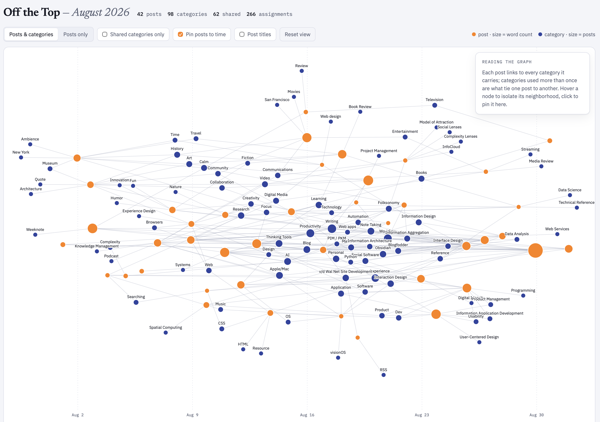
The first is an interactive forced graph with the blogpost as orange nodes with the size corresponding to word count and the tethered edges link to categories for the post. Clicking on the post will show the related categories and pulling on the post node will start to see the other tethered posts connected through the categories. There are few toggles: 1) Posts and categories or just Posts with their related interconnections; 2) Only show shared categories (a category with more than one post); 3) Post to Time, which may be my favorite view, as it take the graph and lays out the posts left (oldest) to right (most recent), with a small light timeline at the bottom and all the other relationships displayed as well; 4) Post titles, which clutters things a bit and adding the toggle resolved that clutter.

You can view this standalone interactive web chart that sits in the Lab :: Off the Top Analytics at the direct link: Off the Top, August Force Graph with Toggles. A sample is here:

A forged graph chart image showing August 2026 posts and connected categories

August 2026 Word Counts

As I was going through the data for August 2026 I knew and could see the word counts for posts, which I don’t have easily (nor quickly) available on my site. But, with the data local in SQLite and I’ve been using the local data to run many types of post analytics, word counts become a simple and quick option that doesn’t impact the site’s performance at all.

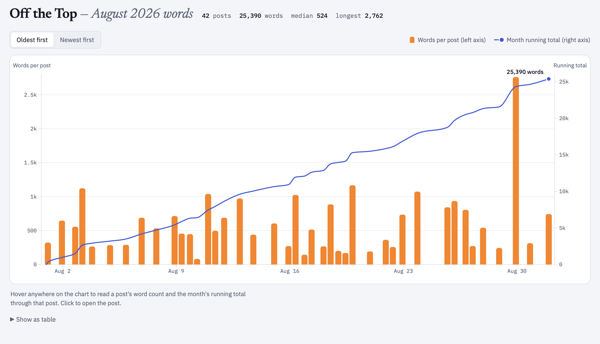
I was really curious about word counts per post across August, but also was more curious about a cumulative word count across the month as well. A quick and easy bar chart and line graph solved this, both having interactive hovers for metadata. August had 25,390 words posted.

The standalone interactive web chart is also in the Lab and the direct link is: Off the Top, August Word Counts by Post and Cumulative Count. A sample is here:

A bar chart image of monthly posts with height correlating to word count and a line above the bar chart showing cumulative word count for the month August 2026 posts

Cumulative Word Count for 2001 to 2026

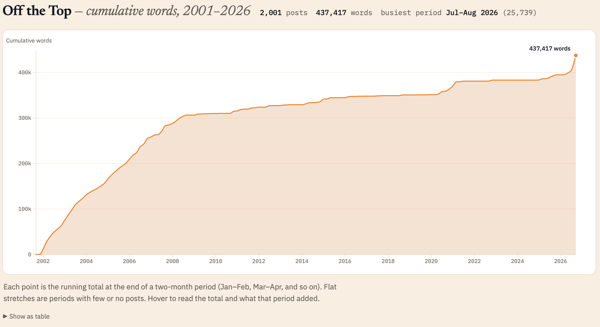
Looking at the cumulative count for August 2026 (the 25,390 words posted in the month) I had no idea what that count was in comparison to the whole life span of the blog (under this CMS that started in late October 2001 and not including the static posts prior to that). I know that in the early months and years of the blog I wrote a lot of short posts and the posts were frequent. Looking at word count I wasn’t expecting the first two or three years to have roughly the same growth slope up to 2008.

Looking across 25 years of posts I knew a single post analysis was going to be a bit rough for an interactive standalone webpage. Monthly would be better, but could still be a bit too much to process dynamically in the browser. Quarterly, was just a bit on the thin side and more difficult to see trend shifts and correlative line slope. I settled on a two-month interval and I had something interesting in under a minute.

July and August 2026 were the highest word count across all time on this blog. The 25 thousand words is roughly a quarter of a 250 page book. But, now that I had the bi-monthly chart I can also see the early years I had roughly similar counts per two months up until 2008 and then there was the “great flattening”, until the “great pandemica” lockdown when things ticked up again until lockdown ease and work went back to its normal patterns.

I ended up over the 25 years with 437,417 cumulative words just on this blog. That is roughly 4 books of 250 pages. It would be a rather odd book, but in just considering word count as the focus. I find word counts odd, particularly writing to word counts. I’ve had a regular column in tech publication that had a 750 rough word count topic, this was at a time when my posts were often 1,000 to 1,250 words on average and 750 words was about where I had the framing set to get to the meat of things. I mostly write on this blog to an amount where there aren’t good words left, which is 200 at times to 2,500 or more. To see my writing shifts in the early years roughly similar in trajectory rather interesting.

The standalone interactive web chart is also in the Lab and its direct link is: Off the Top All-time Cumulative Word Count. A sample is here:

A line chart showing cumulative word counts across 25 years of blog posts

Will this Continue?

Now that these are standalone webpage charts and graphs, I’m not sure what I will do. I need to get the templates consistent from a layout and design perspective. But, once the standalone webpage is created I just copy it to the Lab or other location, and this can be automated with a quick script. I think the month-by-month analytic is interesting, at least to me. I have not only the local standalone version that I posted, but a rough output build that isn’t fully self-contained that I can play with and iterate on.

If you like this and want to see more ping me on one of the services or send an e-mail using the Contact in the navbar.


12 September 2026

Tony Seale’s Knowledge Graph and Complexity Posts

This week I fell into two (mostly) enjoyable rabbit holes. One was digging into the writings of Tony Seale (one of The Knowledge Graph Guys) after a few friends had shared his posts in LinkedIn. The hedging of the enjoyability stems from the utter poor environment LinkedIn is for finding, holding on to, sharing outside the confines, and working with wonderful ideas in one’s own space and properly giving attribution. Only posting information in LinkedIn is like going to a huge supermarket, but cooking, and serving your creation there. LinkedIn is poorly built for this intention. If you care about the ideas you are creating and sharing, put them where you control them and others who are inspired and want to find and interact more with your ideas and you can do so far more easily.

That aside, I did enough battle LinkedIn’s incredibly poor interaction design and information design for idea sharing to find an abundance of good ideas shared by Tony Seale. So many framings are at a good level of a little more than simple but crafted well to have concepts that are difficult for others to grasp easily put closer to within their reach. I am always looking for explainers like these to share and for inspiration. But, even better when the ideas and framings are really solid, like Seale’s.

I dug back into the blog of The Knowledge Graph Guys, which is good, but is lacking a name and the posts don’t have the consistency of the same voice, which is to be expected. But, give names to the different voices.

I found some of Seale’s posts on his Tony Seale – Medium space. These Medium posts focus more on complexity, which I enjoyed as well.

I pulled some notes and graphics from Tony Seale’s LinkedIn posts, but I’m still pulling all of that together (see frustration with LinkedIn). I really like the linking to prior content and outside material in his posts as well as those in The Knowledge Graph Guys (which isn’t all guys). Many of the posts I agree with as stand-alone pieces, but I need to pull them together in context to see those connections. (It is also ironic that Knowledge Graph focussed content uses LinkedIn as the only instance where getting and retaining connections, as in a graph, is quite difficult.) That said it is likely worth your time digging.


25 August 2026

Vibe Markets Don’t Always Rhyme with Good Product

My recent Four Cornerstones of Development post (which I found the initial blog mention on a March 2001 archive page - Off the Top :: March 2001 and later on mention I’m working on an essay on it, which I somewhat remember having a publication ask me to write it for them, but no longer exists) was surfacing in discussion a bit lately when talking with those building quick things for themselves that they had used LLM for coding (as well as much of the interaction and visual design), which is viable for personal use for a stretch and then you hit the reliable, maintainable, repeatable thresholds of pain.

Ooh! This Looks Interesting

But, I’ve looked at a quite a few of these projects (not those that aren’t really products) as they initially seem like they would solve a use case gap I have. But, I saw a video for an app that was pitched and it hit a long-standing need I had that has heavy friction. It was an app that linked to Glaze, which is a product / service from Raycast. I read through the information about Glaze and thought this could be “interesting”. I had trouble finding the app that caught my interest as the Glaze app marketplace is a mess. I finally found the app, looked at the descriptions and images and figured I’d give it a go. I found I had to download the Glaze app to seemingly run the app I wanted within Glaze. This was less than optimal putting a silo wrapper around apps, that has never worked well and there is a long and abundant history of attempts at this poor model. (An app with scripts and workflows that can be added through a marketplace / gallery like Raycast or Alfred is a good model, but full apps that is a very different story).

The Needed Perspective Framing (Likely to be skipped to preserve a rant)

I’m not adverse to people using coding assistance, but there is a lot more to building an app or script than just code (and often being a developer or engineer helps keep the AI coding assistance in check as they can resurface long gone poor practices that are abundant in the training material). Not having background in development nor product management nor design creates a lot of gaps and little depth to know if something is actually good or not.

I’ve Seen this Movie Before and …

I opened Glaze and got the app I had interest in set up, and it was slow, not well considered with limited functionality that would be helpful for a basic app in the genre it sat in. The hope I had was shot, I was rather disappointed (it happens a lot) with the level of a “proof of concept” build that only examines is something possible to let you then you interrogate the hell out of it to figure out what is wrong and how to improve it before you get to the prototype or alpha version. I shut the app and won’t open it again.

I looked at other apps in Glaze. All I looked at had the same level of quality (or I should say lack of quality and basic understanding of what an app is, let alone what a product is).

I jumped to the four cornerstones, as I would on something I was building or running a product group that is creating and developing. Things were sort of usable, but half a cornerstone doesn’t get you very far. There is a lot to know and understand beside an interface that does something and I haven’t found AI services that fill much of this ground that needs to be covered in a solid manner. They can help code decently on small-ish projects (and slightly larger) and get okay (yet often problematic) interfaces. But, the other considerations and forward-looking needs to plan for or at a minimum consider so to account for future adaptation are missing or not supported well. The person building has to bring that understanding with them to drive this to a decent outcome.

Creating an app seems easy but there is a lot that should be considered and accounted for in the process, even for something simple. Putting out what will soon be abandoned ware with a “developer” / creator that didn’t quite ship something solid and left it at that, and not to return.

It May be an Idea Farm

There are a lot of great ideas in Glaze, but the lack of quality has me deleting the Glaze and adding a reminder to not go back. The deletion of Glaze took around 2 hours as the thorough app deletion tools I have were getting errors from many components claiming deletion was not permitted. This often happens when an app is running, but the app had been quit. It has been a long time since I’ve had to go through rounds of rebooting my Mac to rip out stubborn poor app remnants.

Know What You are Getting In To

There are people who have been building good niche products that have used AI to help fill gaps. Most of them have a lot of experience with UI, UX, product, and/or development to know what needs to be done at least at a basic level. Not all of them have worked through all four cornerstones, but they have considered them, and have lived through the hell from not considering and/or working through the cornerstones.


20 August 2026

An AI Site Content Statement

Others have added AI statements on their sites to state or explain the use or non-use of AI. With AI bots popping up in group chats and Zoom, it may be time to make a declaration here.

All writing and images that you read and see here are all made and edited by the human Thomas Vander Wal.

With that said, I have worked with and used artificial intelligence (AI) / machine learning (ML), along with natural language programming (NLP) since 2008. I started learning it and using it to learn and understand. Professionally, I’ve been on many projects starting in 2010 with AI/ML (NLP) for surfacing patterns in large data sets or feeding it large sets of documents to identify patterns, what may have been missed in review, or as one triage method.

So, I don’t use AI for writing, as I write to understand what I know and I share things out to find others with similar interests. I enjoy making and creating to get things out into the world. The creative part is something I really enjoy and I have no interest in handing that over.


16 August 2026

Halfway Through Blaugust

At the halfway point of Blaugust following my saying I was in on Blaugust and aiming for 31 post in August, it is time for a check-in. On the 16th of August I have 22 posts (counting this post), which is more than I expected. I had two personal goals for the Blaugust endeavor: 1) Get back in the habit of posting and comfortable with the workflow; 2) Make a dent on my long list of blogfodder.

Back Comfortable with My Workflow

Not only am I comfortable with my workflow, but I’ve made tweaks to it. I have a lot of Daily Dump notes with things written out in the sections that could easily turn into a blog post. Now I have a smoother flow taking those notes and quickly extracting them to their own note, immediately having it transcluded back in, add the blog note framings, as well as blogfodder tracking, which makes it very quick to extract, wrap it for a post, and run through the edit and posting steps.

I am not only more comfortable with my process, but I’m feeling like I’m back living in my site again. I am using my blog search as I prep a note to potentially post to see what I have that may be similar or nice to add to a post as a reference. I also have been finding quite a few small UI gaffs that needed fixing and knocking them out. All pages in the blog area should have “Blog Search” in the navigation. There were layout twitches in layout switching between blog main page and individual post pages, which has been there a long time. This twitch isn’t fully gone, but far less noticeable.

Another thing I did was add some categories to accommodate creative and fiction posts, which I have been trying to sort out what to do with them. I may have another option at some point, but for now I have a decent option.

Making a Dent In Blogfodder List?

Uh… On this front I have knocked out a few items on the blogfodder list, cleaned up the list a little, but the list got a bit longer. Many of the posts for Blaugust have been new ideas and not coming out of the blogfodder list. Many of the items on the list are longer pieces and need more work, but they are likely going to be posted on Personal InfoCloud, but I will note here that I’ve posted there (just like the old days).

Some of those longer pieces will cover: “folksonomy and LLMs” (this question comes up a lot and helping quite a few understand the realities and frame their needs); “My working with AI since 2008”; “My AI policy for my sites (in short nothing read was created or edited by AI)”; “AI and Social Computing (particularly around teams and organizations)”; and other topic. I have quite a few others I swore I have posted over the years, but nope, so I’ve queued those up as well.


10 August 2026

My Automations Over the Ages and Today’s View

For a few decades I’ve converted regular manual tasks into automated tasks for many things. I use short code keyboard conversions with TextExpander (TextExpander), Alfred (Alfred), Keyboard Maestro (Keyboard Maestro), Hazel (Hazel by Noodlesoft), Apple Shortcuts, and a couple other small apps and services. But, I also have quite a few scripts in python and Ruby, but a few pure bash scripts. I have a handful of apps that use Claude Cowork (Claude Cowork | Claude by Anthropic) on a schedule and used where the data is not always standard, so it aggregates and structures the data where it often later gets processed by python.

I started building and running automation scripts in the 1990s to handle tedious tasks with multiple steps, or would likely be victims for typos, and which I was handling daily. A task that would take 3 or more minutes (often longer) and had structured stable data I could search made it viable to become a script and automated. I had them to filter email to folders, filter downloads to common folders / directories, and one to turn off audio for the evening which monitored Twitter every 30 minutes for my nightly signoff (“off to read and sleep - zzzz”) and it would mute audio. I’ve had a few for audio that would capture podcasts I was on for a local copy during recording that took just one button click to set Audio Hijack Pro properly and it just worked.

Moving to the Current Adaptive Flows

The last six months (or a little more) I’ve been building aggregators to capture what I’ve done the day before (and the week prior for a manual review). I’ve also automated my morning Obsidian (Obsidian) setup, so that my daily note (or Daily Dump for my notes, in my vocabulary) templates are created for the week ahead with a python script, rather than creating a new note and use a TextExpander snippet to build the structure each morning. But, doing this I realized that I could take my daily task list and the list of potential tasks I keep at the top of my Daily Dump and script the moving uncompleted items to that day’s Daily Dump from the day prior, but also quickly run a calendar scan for the day with Claude and the BusyCal MCP to have my known items at the top of the note written directly in the note. The completed items and checked off were left on the prior day’s Daily Dump in their sections.

In order to run the scheduled python scripts I need my laptop to be awake in the background (but it still the screen remain locked) so to run early morning tasks. I found PMSET as the key to handle the wake-up for the first run and have a python script handle the remaining wake-up processes for that day.

I now have a mix of Claude Cowork Skills (which if I sort out the data is stable enough I convert them to python for consistency, speed, and sustainability) and python scripts that pull my prior day’s files created and worked on list, my items in a feed of the prior day’s additions to Instapaper, Pinboard, and a list of new items in DevonThink as PDF (with links to the PDF as well as a working URL to the source of the item), a list of Readwise articles and video transcripts, and videos I liked and sent to my personal instance of Slack. These lists are in markdown and placed into the directory Obsidian watches over. Most of them a little later in the morning are transcluded into my Daily Dump note for the day where I read through them.

Morning Process

My morning process is to read through what was done the day before and edit them to add links to other resources in Obsidian and write notes. Often I have some entries that will turn into that day’s list of things to do or one of the “potentials” list. I will take items that need to be their own item note or be included into a concept note. This keeps the items fresh on my brain and connecting things to where I can get back to them more easily.

I write this today, as this morning I found my morning automation hadn’t fully run properly, because my Sunday evening script to create the week’s Daily Dump notes didn’t run as it was a cronjob and I was cooking with the laptop asleep so the job didn’t kick off. This morning I converted the cronjob to a launchd task instead and to run on Sunday during another automated wake open window.

Weekly Aggregation

Sunday’s I also run a weekly wrap-up, that pulls everything done for the week. I’m finding this is a bit too much information for a quick review and a manual assessment for the week where I aim to map out things for the upcoming week. It is a bit too much information overload. I don’t know what I’m going to do about it. Now that I have things automated and aggregated I need to rework my human side of things.

The Value of the Automation

The goal of my automations is to give me time back and remove the manual and grunt work so I can do the thinking work. I’ve done this with personal life and work life (and large systems and projects). The current round of automation and aggregation surfaced that I am doing more than I thought I was doing. Another goal is to give more time to do the human thinking and the projects and work needed. I do this so I can do the creative human work and the human thinking work (I find large errors in summarization in nearly all generative AI and creative work so I keep that at bey and use it for grunt work that I check). The scripted automations don’t need the hand holding and I have some occasional test run to check on them to see if they need attention and honing.


6 August 2026

Podcast Interviews and Presentations the Last Few Years

The last few years I’ve been on a handful things that have been shared out, but I’ve not posted about them. I’ve started to add them to my homepage, about page, and an old media pages. Posting things here, sometimes slips my mind.

The first two are for a company I’ve long been a fan of The Omni Group as I’ve used OmniGraffle and OmniOutliner around the time I picked up my first Mac for myself in 2001. The two products may have been included with the purchase of Mac and were great apps that have been a have been a central part of "the tools I think in" and communicate using. They asked if I would be on to talk about my use.

OmniGroup Podcast

In 2023 I had an invite to talk about my over 20 years of use of OmniOutline and OmniGraffle for the Omni Group’s podcast. (I also have used OmniFocus heavily, but haven’t been using it for a while due to work limitations and I got out of the habit and I haven’t restarted the habit). The interview by Andrew J. Mason with me talking about, How Thomas Vander Wal Uses Omni Software. I really enjoyed this interview as I’ve deeply enjoyed and used OmniOutliner and OmniGraffle for a very long time. I have my full set of Complexity Lenses and sub-elements (Complexity Lenses – An Overview – Personal InfoCloud) (there are now over 100 lenses with over 1,500 nodes altogether). I use OmniGraffle a lot for explanations, diagrams of systems and processes, but also quick graphics to put into Keynote presentations.

OmniGroup Podcast 100th Episode and 30 Year Celebration

100th Episode Celebration with Ken Case - In this I have a short snippet to offer thanks and congratulations to the 100th Episode of the podcast, but also to Ken Case for 30 years of OmniGroup. I was deeply honored to be asked to contribute to this and to be included with so many other wonderful people whose work I’ve deeply appreciated as well for many years.

Seeing Clearly Through the Fog of Complexity - on the Complexity Lounge

In February 204 I did a two hour presentation and Q&A with the The Complexity Lounge to present my Seeing Clearly Through the Fog of Complexity talk. This is a good group and having this available to share is a wonderful asset to have. This is a decent intro to the Complexity Lenses and contains around 12 to 14 lenses touched on during this talk.

Sustainable AI That Has Our Backs interviewed by Jane McConnell

Also in February of 2024 I was interviewed by Jane McConnell for his Imaginize World podcast talking about sustainable AI - Sustainable AI That Has Our Backs — Thomas Vander Wal | Full Podcast Episode - YouTube. This touches on the balance of assistance it can offer, but also some of the troubling areas around it. I started working with AI/ML (along with NLP) in mid–2008, and that background comes into this discussion.

MacSparky Members Only - DevonThink Power Use Overview

I did a deep dive on my DEVONthink use, which I’ve used since 2003 and now has roughly 180,000 objects (in one database) with David Sparks for one of his groups in MacSparky Labs. I don’t have access to it, but it is out there as well. Since 2003 I have tucked away anything I think I may have potential future interest to me in into DevonThink. I’ve been amazed that DevonThink’s incredible search on what is in its database is still solid and quick. But, its most amazing feature to me is the “See Also” tab in its insights button, which when looking at a document it will show you other documents related and its strength of confidence on that relationship. This See Also is incredibly good and has not only found things I wasn’t looking for, but it has drawn connections to things that have been massive lightbulb going on moments and started new idea and paths of exploration.


4 August 2026

The Guideline of Two Things Not to Discuss Is Now Three

The rough guideline for what not to discuss in polite company are (well were) two things: Politics and Religion. This is to avoid arguments and rabbit hole to hell conversations.

It seems there now is a third on this list, AI. I’ve seen a good gathering utterly devolve after AI start coming up. Much of the conversation isn’t well informed (or even partially informed), but there is a lot to know and a lot of different sides / dimensions. Even being well informed on all sides one can still be deeply conflicting for an individual.

AI, as a whole has been around a long time. I started into AI/ML (along with NLP) in 2008 and found it helpful, but found it resource intensive and you had to know quite a bit to use it. In 2008 I figured I was behind. Today it is easier to use, but you still have to know a decent amount around what it is you are doing in what you are wanting to do and know know AI well, to get something decent out.

The current efforts aren’t all they are cracked up to be, vastly over-hyped, and the “creative” outputs are tilting toward meh at best and often best skipped. Many people think the intelligence portion is smart in domains they themself don’t understand well, but not so great in areas they do understand well.

Quite a few times I’ve started to have, what I hope to be a good discussion about all the dimensions of AI (it is vastly more than GenAI) and learned those discussion I need to keep to a few people whom know well, all the sides or many of them.


5 June 2026

The Poetry of Time

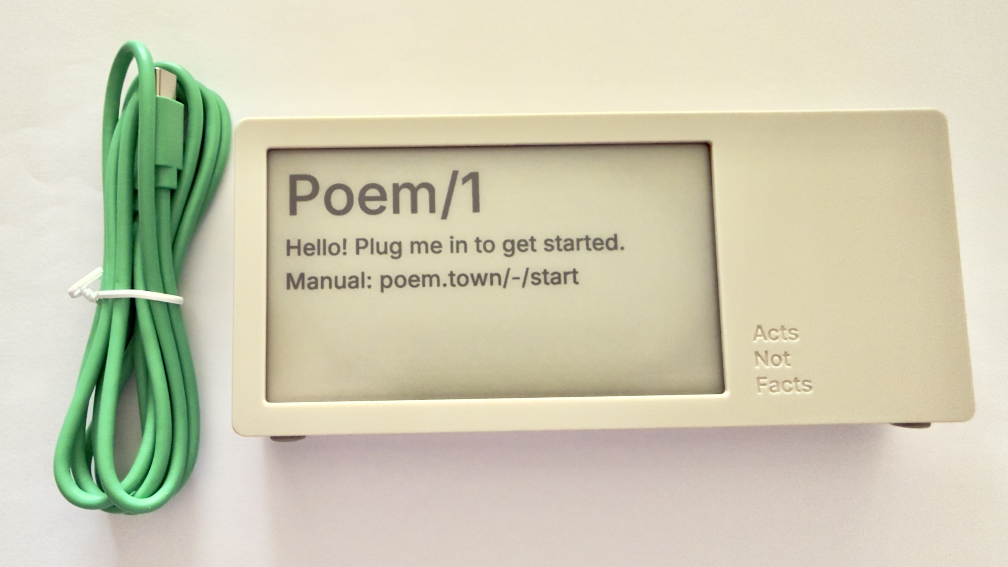
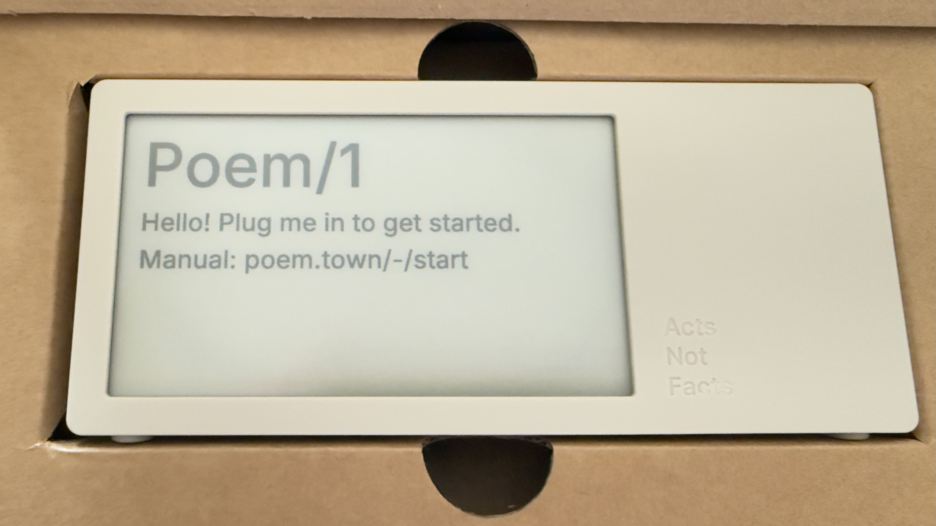
Today a package arrived that I’ve been deeply looking forward to. Part of the anticipation is the pure utter whimsy of it, part is it was a Kickstarter project that involved hardware (read hardware is hard when manufacturing is involved), and knowing the creator and watching all the steps along the way I was happy to see it and touch it. This is the Poem/1.

Poem clock in the box

Most of all, this device is giving me a lot of enjoyment and, well, glee.

The Poem/1 Arrived

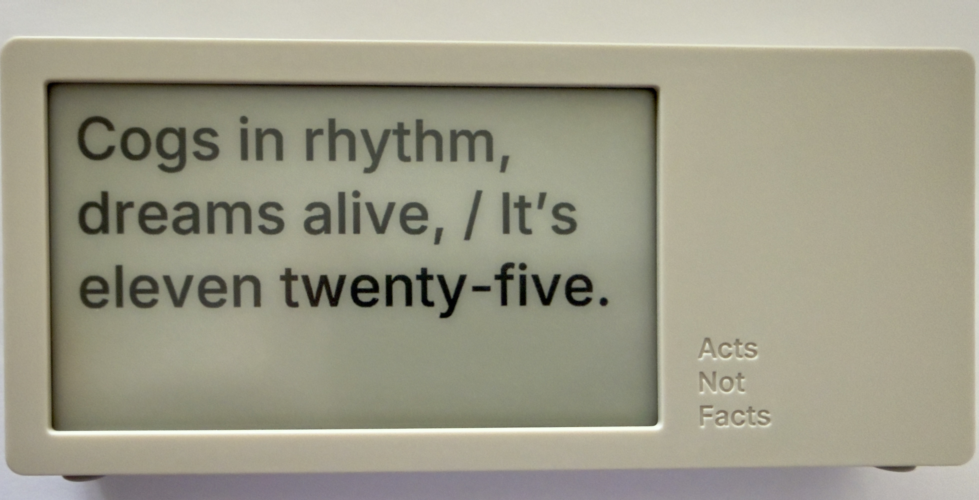
This poetry clock in the few hours I have had it running, with its e-ink display that updates every minute with a new poem for the time, which is / was generated by AI. Some of the poems are, well unique, and others are wonderful, but they can be favorited with the one button on the device.

The one button does a lot of work. It can be used to favorite a poem. There is a site with a dashboard for your device where you can push it notes you write to display, but to clear the note and get back to the clock you use the one button. There is a sleep mode with a screen saver and to clear that, you use the one button.

Poem clock and USB-C cable

The Poem/1 also has one USB-C cable. There is no manual in the box. Everything you need is the new Poem/1 device, the USB-C cable, and the e-ink screen tells you the rest.

After plugging it in you get a screen with some technical details and a QR code and using your phone with the QR code it then walks you through everything from easily connecting it to your WiFi (if printers could do this…), then make a selection or two and you have poetry time. There is also a dashboard website and the setup to your device is incredibly easy as is the setting up the account on that site.

photo of poem clock displaying Cogs in rhythm, dreams alife, It's Eleven twentry-five.'

The Journey of Poem/1

About 3 years ago Matt Webb blogged about an idea he had about an AI poetry clock, My new job is AI sommelier and I detect the bouquet of progress (Interconnected). This soon got connected to an e-ink device and Matt was on his way.

Matt setup a Kickstarter, which I happily backed. It wasn’t that I was overly keen with the AI bits (I’ve been working with AI/ML going back to 2008 and stayed current and it is a thing that I treated, like most everything else, as a tool). But I enjoyed the process of little printer – BERG and its outcome from afar. Having watched Little Printer’s journey of toil to come to life from Berg London (Matt and the amazing folks there), I wanted to support Matt (who mostly did this Poem/1 project alone). This provided insite into his long journey of quickly getting to a working prototype, then the slog of finding viable parts, a manufacturer, various regulatory approvals, and iterations when due to various things there were changes made late mid-stream to add to the delays.

Matt has done a good job logging his slog and journey. There were times where I’d realized I’d forgotten about Poem/1 and not heard of any progress in a while. About that time Matt would have an update in Kickstarter or on his blog.

Then there was US Customs, which stalled things for a while (not the tariffs, which became a hurdle earlier), but there there was more paperwork needed around “what is this clock”, oddly I (the customer) was sent the forms and I knew there wasn’t a winding mechanism nor jewels in it (well I haven’t checked inside, but pretty sure there are no jewels). Matt did a great job documenting the US Customs documentation hurdle in his post, How global logistics got me over my fear of personal agents (Interconnected) (my having worked at a Custom’s Brokerage for a few years I know the many reasons brokerages are needed).

What Time Is It?

I love the ability to favorite a time. (What is your favorite time?) In a few hours I have a couple favorites that I quite like:

Puddles reflect lost skies, / At two forty-five, heart sighs.

At twelve fifty, shadows creep, / Secrets held within silence deep.

Willow branches gently sway, / It’s twelve twenty-five today.

Thank you Matt I now have favorite times and a wonderful product.


10 May 2026

Joy Filled Email about Poem1 Shipping

This weekend started with an email about something shipping that I’ve anticipated for nearly 2.5 years. In January 2024 Matt Webb posted about a hardware clock what shows AI created poems for all the times of a day on an e-ink screen. This was something that caught my interest, less for the AI and more for the whimsey. But, the other part of it was hardware and the adventure that brings.

Not Matt’s First Hardware Experience

Matt had been part of Webb and Schulze, which turned into BERG London that was highly innovative playing with ideas at the edges. One of their creations was little printer. Part of watching that journey was some of the creation and manufacturing of the hardware that Berg shared out.

With this poem clock that Matt named “Poem1”, he turned it into a kickstarter project, and that brought along with it a look into the creation of a hardware product as it really is for things not at the scale of tens of thousands, if not orders of magnitude higher. Hardware is hard for electronics with getting all the parts approved, and then lined up to run through production it is a painstaking process and incredibly long.

So Excited by the Email

When I saw the email I was excited, like one is for people finishing an around the globe sailing adventure or some other long arduous feat. Getting the device will bring enjoyment, but watching from the blog about the inception of the idea, through turning it into a Kickstarter project and the emails about progress and the long waits between emails when approval waits were happening (or looking for plan B or Q for dealing with a part change needed).

I am so happy for Matt and having his device out into the world in people’s hands shortly.


21 June 2025

2025 Vanderwal.net Backend Modernization is Done

A couple years ago I thought I would update the backend code from PHP 5.6 to PHP 7 and initial progress on it was hindered by time available.

Planning the Modernization Work

A few weeks back I started looking at it again and mapped it out properly like a project. I realized PHP 7 was deprecated and I should really head to PHP 8, so that target was set. I was planning on keeping things relatively simple using a database connection quite similar to what I had used, but digging through PHP 8 books and resources on O’Reilly Learning Platform everything was using a newer more flexible method. After digging further I took the route that would take a bit more work modifying existing code (some going back to 2000 and 2001). But, as I dug into the work I realized I was only needing to modify and modernize about 20% to 30% of code on the pages and templates.

In doing this I also realized my old method of security around the system management backend was no longer working, so it had to be rewritten as well. That meant rebuilding the backend screens. Those updates went live two days ago on the 19th.

With that done it was back to the last third or so of the pages and templates that are public facing. I had already reworked the category output pages and adding pagination to them. No longer will all 121 Folksonomy categorized posts show up on one screen, only 15 at a time will. The “Personal” category has 369 posts (it is a blog so it is about me, you see, but just not all of it).

The RSS feed received a very minor update to RSS 0.92 to keep in line with many of the OG methods that remain.

The Actual Homepage has been Restructured

The homepage for vanderwal.net has been restructured to make it easier to find information that isn’t directly in the blog and I get emails and DMs about somewhat regularly. Moving it to two columns helped this. I do need to modify this to flex or grid CSS model as tweaking the layout was rather tedious.

This Modernization was like Changing the Plumbing and Wiring in a Building

This modernization was like bringing the plumbing and wiring of a building up to new building code. The walls and structure are all pretty much the same. The top layer stays the same for now.

This modernization does allow me to hopefully finish setting up webmentions, which I’ve had partly wired since around 2021 or so. I just need the last piece to that to work. There are also other IndieWeb related updates I’m planning on making and have been waiting to get this code updated before modifying and adding them into place. By the way, if you are running your own site and/or blog, the IndieWeb community has a gem. There are a lot of resources in their wiki and pages helping anybody with their own site.

The pagination for the blog is likely going to change from a date with month focussed pagination to a page model with the oldest selection being page 1. The archive page will get a long over due update so it doesn’t stop at 2003 (looks at calendar, yep it is out of date). I’m hoping to have an archive page that shows activity, but also addresses the different post types (essay, journal, and weblog) that only lasted the first few years, but also around the 2014 code update and site move the entry type template went missing.

The category listings pages will also likely get an update and the category page may likely get some ease of moving through the posts over time, beyond general pagination.

Assistance with the Update

This being 2025 the question pops up if and how I was using generative AI as part of this. I was using Claude.ai from Anthropic with some initial questions, then I’d head to O’Reilly’s resources to validate them and learn what I needed to know (it had been about 10 years since I was knee deep into PHP). When coding and modernizing the pages and templates I’d and hit defects I’d run those past Claude to sort out what the issue may be (sometimes missing “;”, others the new query wrapper and parsing method caused me to miss something, or I had deprecated code I hadn’t converted). Claude would point out my errors and instruct me how to correct it. Sometimes it would offer a few options for approaches (some were not quite right and others were good and I needed to select a path - after verifying and learning about them further). It also would crank out code. I gave Claude instructions not to bother with large chunks of my pages and code, which it left alone.

I use Claude stand alone and used is Project function to keep things focussed. I fed it the outlines and high level task areas I have in GitHub and Obsidian and it was keeping track of what was accomplished and how the work met the goals. The most impressive thing, compared to other generative AI options is it was very strict with identifying things not viable in PHP 8 (and its iterative versions) as nothing else did this well. Claude also had the code of pages and templates I had worked on and would point out I was using a structure and method in other page and ask if I shouldn’t use that practice on the page I just fed it to sort out some defect I was working through. My code has had four or more iterations over the 25 years and my early coding wasn’t so hot and still remained. Claude helped my code get more consistent, not by it fixing it, but pointing out I had something good and modern and I should keep consistent with that. By the last couple of templates I didn’t need to have Claude check them as they worked with my own editing, but I still fed them in as it seems to help improve suggestions and catching lack of consistency of my own doing.

A year ago I tried this with OpenAI and its ChatGPT and it was a hot mess. It couldn’t keep PHP versions correct. I try it with every update and I find it really problematic and what it outputs (code and other attempts) as nothing better than mediocre and often not correct.

IDE Use

In the last 10 to 15 years the IDE I’ve used to code and work on vanderwal.net has been from Panic and either Coda or now Nova, which have worked well. I have kept a good firewall between AI assistance and the IDE. I don’t mind type ahead suggestions. But, finding deprecated code to address was something I was going to need. Some friends suggested I try PhpStorm by JetBrains, which seemed good as I’ve used PyCharm a few times in the past and really enjoyed it. I knew I didn’t want VS Code near this, as I’ve pretty much had it with VS Code (I mostly use it with Python for data analytics) due to plug-in issues and lack of ease keeping projects separated.

I picked-up a trial of PHPStorm and after a day or so I had the hang of a good portion of what I needed to do. My favorite part is the setting the exact version of PHP you are working with. It highlights where there are errors and problems. In the last couple of days as I finally was getting the hang of PHP 8 and the methods I was regularly using PHPStorm was helping with type ahead suggestions (there were a few times where I accidentally triggered them when I didn’t want them and nearly turned of that functionality - control Z is your friend). PHPStorm also can make use of GitHub CoPilot, which I don’t find helpful with OpenAI connected to it, but is better with Claude Sonnet. The downside with CoPilot is it doesn’t have access to the Project space in Claude I’ve been working with and therefore its suggestions are less on target - CoPilot with Claude is light years better for PHP than OpenAI offerings). Essentially I didn’t use the incorporated genAI functionality and I was very happy with that setup.

Posting Ease

One of the things I’m looking forward to are slightly better methods for posting to this site and managing posts. Many of the steps beyond creating and posting are manual steps, like kicking off creation of the RSS feed (I do that after a quick review of the created post as it is live, I kick the RSS feed after that review). The alerting the media, or the alerts beyond basic RSS, is also a manual step done after that review. I may automate the combination of those two kicks after a review.


18 June 2003

Phone butler learns your ways

The Beeb offers insight into the Phone Butler. This phone app learns what calendaring events the user will set and which she does not. The learning how the user thinks is the wonderful part. This could be a nice step forward for artificial intelligence (AI) if it would grasp the fine discriminators.

In the past I have opened up my calendar requests to a coworker to accept and reject invites for me. This was needed as many days I have back-to-back meetings and face-to-face time on my way back from meetings. An application that could do this and respond when there are overlaps in appointments and know which has priority would be great. If it could synch my work and outside life across five machines and devices and four Operating systems and six applications I would be in floating on clouds.


This work is licensed under the Creative Commons Attribution-NonCommercial-ShareAlike License.