Off the Top: Product Entries

20052010201520202025

Showing posts: 1-7 of 7 total posts


22 September 2026

A Stunning Video on Design and Porcelain Watch Face Creation

As I was wrapping things up last night and I had calm travel videos on for ambient background, YouTube offered up something different that I found amazing on many levels.

The video was from the watch brand anOrdain (anOrdain from Glasgow’s Southside), which I had not heard of, but that isn’t a surprise as I’m not a big “watch guy”. I’ve had a few decent watches, my dad’s Rolex when he passed and that was 99% sentimental. And Apple Watch which is largely utilitarian, but designed well.

The anOrdain video was on their YouTube channel and focussed solely on their Model 1 Porcelain watch and the design, craftsmanship, and the process. I found the video incredibly well produced and the story of their process to make the porcelain face, the typography, and the hands. It is a highly designed and crafted watch and the video matches that really well.

The Blue on White Porcelain Video

The video Blue On White | The Model 1 Porcelain - YouTube - anOrdain color hues, pacing, focus on details is a wonderful bit of video craft on its own. But, it matches the watch maker’s esthetic and practice so very well. I’ve watched a couple other videos and they have the same craft and design forward esthetic and feel.

What I Fell For

I don’t know that I’ve really fallen for a watch. I have for things really well designed and crafted, but watches rarely fit that bill as many tilt toward flashy and gaudy not elegant. What struck me with the watch is the face with the white porcelain and the incredible blue that is a Delft Blue. It somewhat reminds me of the Elizabeth Tower Clock / Big Ben - Wikipedia after it had been refurbished and the decades of dirt and grime removed and the hands and markings were blue (Big Ben Elizabeth Tower London 2023 01 Detail - Big Ben - Wikipedia). This combination resonates really well with me and it is calming and beautiful in a way most watch faces aren’t.

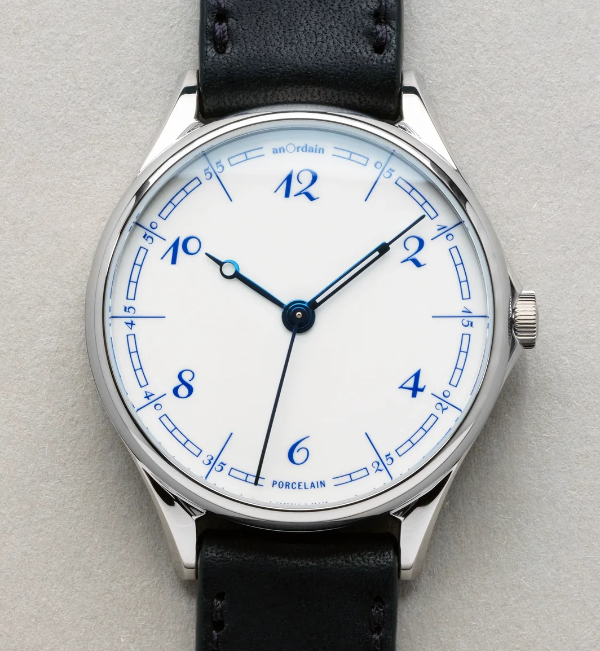
White watch face with Delft Blue numbers and markings, with blue hands created from heated steel

That wonderful white and blue combination is often really striking to me. On the anOrdain watch, The Model 1 Porcelain, it is matched with the details of the face with the curved blue rectangle markings, the custom typeface by Kia Tasbihgou (Design Practice of Kia Tasbihgou and Kiatas on Instagram and article about his typeface designs A campaigner for the unconventional, Kia Tasbihgou discusses his latest typefaces ), which is classical and playfully exaggerated like a hand drawn set of numbers. The hands on the watch are distinct and unique from each other, and are a blue from heated steel, which are a different hue and shade, but rhymes really well.

This is well outside my budget. It looks very much like an art piece crafted for one’s wrist.


15 September 2026

Two New Categories that May Have not been Noticed

In yesterday’s post (A Rainy Virtual Walk Sparks Reading) I had a couple friends reach out today and comment that there was a new category, Calm :: Category :: vanderwal.net, that appeared. This is correct, I added “Calm” as a new category (today I went back and added it to past posts were it applied as well, a few more may be added as I discover the need).

But, I also made another addition in categories and used it on yesterday’s post as well, Ambience :: Category :: vanderwal.net.

The Two New Categories Have Long Been Central as Perspectives

The idea and ideal of calm has been something central that I realized I seek and have noticed for more than a couple of decades (and in reality, much longer). In 2000 I had a moment where this really struck me as I was leading a skunkworks / innovation project, but also writing code and coordinating the design to code, data interactions, and interoperability to other services. There was a lot going on and it needed focus. I hadn’t noticed that my desk phone had been quite for months. The assistant to the Executive Director came into our office to find me and apologize that somehow my phone number had been routed to the bureau’s fax number. I no longer had a working phone at my desk and hadn’t had one for months.

The apology came with a promise to get a phone working for me again. I realized the focus and lack of extra disruption this provided me with a calm environment to get things done. I asked for a promise to not turn the phone back on. My preferred method of communication was instant message, which I would read and reply to when I cleared my head of what I was concentrating on or email as an alternative. The phone ringing meant I should drop what I’m doing and respond.

But, I had long been aware of the need for calm environments. I like the loud, chaotic, and erratic, but in limited doses that have a known end. I learned early that severe silence also is a trigger alert for the brain for trouble. There needs to be a little something, but often something minimal so one can focus where they need to focus.

Calm and Atmospheric Ambience as a Criteria

I’ve long had a preference for calm interfaces and interaction models in design. I tend to push things out that scream for attention. But, with user testing I’ve found most people get distracted for heavy motion interfaces that are there to wow, but the motion isn’t the focus, it is the content that goes with it, which utterly fails at designing for use. This is often from people who don’t understand good design, nor what a product should actually do as the product’s purpose.These are basics, not good to haves.

For years I’ve had my devices with the sound off, or a light ambient sound that is just noticeable in the background. I may have something in the background playing as music or atmospherics (like the background sound of a damp Paris walk for a few hours or a calm cafe). That ambience is akin to calm, but also provides something that is in the background and not screaming for attention. It is an atmospheric layer that can mute or numb the jarring cacophony.

When I’m writing to capture things as notes or writing to understand things a little light ambient sound helps. But, when getting to the honing of that output I need the focus on that task at hand. One of my workflow passes for things I write often goes through iA Writer app, which I bring up a fair amount, a it is focussed on your words you are writing. It is an interface with a calm interface, but can fade to your words you are writing and little more, or further fade further to the line you are writing in context of a few lines around it. The calmness and ambient focus pull everything else away.

There is a kindred relationship between calmness and ambience / ambient environments that pull one into focus and regard the task at hand with the care and attention it needs.

Calm and Ambience are Attributes Worth Noting

In my notes on environment, gatherings, but also apps and services the term “calm” shows up a lot. These are often things I deeply enjoy and appreciate. I equate ambience with atmospheric essence and ambient qualities that don’t overwhelm, but are just noticeably there to augment, but not take the focus.

As I think about adding definitions to the category pages, these two terms, calm and ambience, are ones that are a little squishy. I also realize but I’m realizing I need to call out more as the are often central to getting things with the focus in the right places.


25 August 2026

Vibe Markets Don’t Always Rhyme with Good Product

My recent Four Cornerstones of Development post (which I found the initial blog mention on a March 2001 archive page - Off the Top :: March 2001 and later on mention I’m working on an essay on it, which I somewhat remember having a publication ask me to write it for them, but no longer exists) was surfacing in discussion a bit lately when talking with those building quick things for themselves that they had used LLM for coding (as well as much of the interaction and visual design), which is viable for personal use for a stretch and then you hit the reliable, maintainable, repeatable thresholds of pain.

Ooh! This Looks Interesting

But, I’ve looked at a quite a few of these projects (not those that aren’t really products) as they initially seem like they would solve a use case gap I have. But, I saw a video for an app that was pitched and it hit a long-standing need I had that has heavy friction. It was an app that linked to Glaze, which is a product / service from Raycast. I read through the information about Glaze and thought this could be “interesting”. I had trouble finding the app that caught my interest as the Glaze app marketplace is a mess. I finally found the app, looked at the descriptions and images and figured I’d give it a go. I found I had to download the Glaze app to seemingly run the app I wanted within Glaze. This was less than optimal putting a silo wrapper around apps, that has never worked well and there is a long and abundant history of attempts at this poor model. (An app with scripts and workflows that can be added through a marketplace / gallery like Raycast or Alfred is a good model, but full apps that is a very different story).

The Needed Perspective Framing (Likely to be skipped to preserve a rant)

I’m not adverse to people using coding assistance, but there is a lot more to building an app or script than just code (and often being a developer or engineer helps keep the AI coding assistance in check as they can resurface long gone poor practices that are abundant in the training material). Not having background in development nor product management nor design creates a lot of gaps and little depth to know if something is actually good or not.

I’ve Seen this Movie Before and …

I opened Glaze and got the app I had interest in set up, and it was slow, not well considered with limited functionality that would be helpful for a basic app in the genre it sat in. The hope I had was shot, I was rather disappointed (it happens a lot) with the level of a “proof of concept” build that only examines is something possible to let you then you interrogate the hell out of it to figure out what is wrong and how to improve it before you get to the prototype or alpha version. I shut the app and won’t open it again.

I looked at other apps in Glaze. All I looked at had the same level of quality (or I should say lack of quality and basic understanding of what an app is, let alone what a product is).

I jumped to the four cornerstones, as I would on something I was building or running a product group that is creating and developing. Things were sort of usable, but half a cornerstone doesn’t get you very far. There is a lot to know and understand beside an interface that does something and I haven’t found AI services that fill much of this ground that needs to be covered in a solid manner. They can help code decently on small-ish projects (and slightly larger) and get okay (yet often problematic) interfaces. But, the other considerations and forward-looking needs to plan for or at a minimum consider so to account for future adaptation are missing or not supported well. The person building has to bring that understanding with them to drive this to a decent outcome.

Creating an app seems easy but there is a lot that should be considered and accounted for in the process, even for something simple. Putting out what will soon be abandoned ware with a “developer” / creator that didn’t quite ship something solid and left it at that, and not to return.

It May be an Idea Farm

There are a lot of great ideas in Glaze, but the lack of quality has me deleting the Glaze and adding a reminder to not go back. The deletion of Glaze took around 2 hours as the thorough app deletion tools I have were getting errors from many components claiming deletion was not permitted. This often happens when an app is running, but the app had been quit. It has been a long time since I’ve had to go through rounds of rebooting my Mac to rip out stubborn poor app remnants.

Know What You are Getting In To

There are people who have been building good niche products that have used AI to help fill gaps. Most of them have a lot of experience with UI, UX, product, and/or development to know what needs to be done at least at a basic level. Not all of them have worked through all four cornerstones, but they have considered them, and have lived through the hell from not considering and/or working through the cornerstones.


23 August 2026

Four Cornerstones of Development

In the late 1990s through 2010s when working with development and product teams the four cornerstones of development were always at the tip of the tongue or as a small poster on a wall somewhere. I know I wrote this up somewhere before and likely presented it in the late 1990s and/or early 2000s. Working in enterprise environments where people would get involved in product and development, but don’t have background these cornerstones were essential to bring up as basics.

The last few weeks and months I’ve been thinking of this a lot and wanting to point to it, but realized it isn’t really on line other than a quick mention in a 2003 post of mine – Needs When Running a Service. Actually, it is something I am always wanting to point to. With the increase of vibe coding and people creating products for “unique” purposes, but then people are sharing these more widely than personal use, the need for understanding and considering what they are getting into is really needed.

The Four Cornerstones of Development

These four cornerstones were initially called out for information application development, but applied to all user-centered development and product management. If a team building didn’t focus on all four of the elements from the beginning to make the right decisions early (or have them framed and adaptable) the product was really going to struggle.

The four elements are: Usable; Reliable; Maintainable; and Repeatable.

In the current state of quick development by non-developers using LLM coding tools the only one of these cornerstones that is known or partly handled is the first cornerstone, usable. What is made may be usable, or mostly usable, but that won’t really last and when selling it, sharing it widely, or having others rely on it. The reality means the person developing and shipping has unintentionally signed up for things they don’t have background in and often the LLMs aren’t that helpful with. Much of what is coming out as apps are proof-of-concept level of completion, which doesn’t get into any consideration of the other three cornerstones.

Usable

Usable is the first hurdle and focusing on the user and their needs. If things aren’t usable the offering doesn’t really have much. The other cornerstones don’t really matter, if the offering isn’t usable. But, usable and not having the other cornerstones will be problematic.

To be usable, even if it is a single simple use case, how adjacent use cases that aren’t supported are handled or avoided should be as clear as possible. The capabilities and limitations being clear help with the ease of use and understanding something when someone hasn’t touched it in months.

Reliable

The reliable cornerstone is what starts making the offering stable, secure, and enduring. The bugs have been remediated and it works as intended continually. Security and levels of privacy considerations have been put in place and consistently work as intended. But, so do the core myriad of use cases that were intended to work and also be supported, continue to work.

Lacking reliability you have something that breaks at various stress levels and use cases (core uses cases or edge cases). Building and shipping requires setting bounds for what is supported and how, but also how well the edges of what is supported are handled.

Maintainable

Maintainable gets to the reality that products and shipping them doesn’t mean something is done when shipped, it is the beginning. When planning out what is being built how it will be maintained over time and supported is essential. How will the product be updated to support changes to the coding language and/or operating system, and device updates. How do the regular changes in languages and operating systems get handled where security patches are made and break apps and services for users that use apps and services that aren’t updated.

User / customer support and how this is handled also falls into the maintainable cornerstone. Planning for maintainability and how that will be handled needs to include support as the two are often tightly related. When something breaks or doesn’t work as expected, that becomes support work. The support work is often related to considerations and steps (or not making them) the area of the maintainable cornerstone.

Repeatable

Repeatable is one that often gets left of consideration and one that is essential if what you built gets popular and scale. It is often thought of as something that may happen in the future, but understanding early on how to handle repeatability means it should be easier when the time arrives. Repeatability is needed when a server or service built on crashes and is not available or you need to replicate server backends for supporting the service as it scales (there are a lot of needs for repeatability, including building sandboxes to test and develop).

Everything changes as it scales and understanding that at the start of everything (product, organization creation, shared simple scripting project, etc.), gives a decent foothold to when growing and scaling hits. Planning not to scale is also an option, but often that can take just as much work as scaling and you need to be prepared for not scaling when others really want what you’ve made.

Not planning for this early and accounting for how to design the development of the app and/or services for this will lead to painful issues with growth or the reality of moving from one supporting backend server / service to another as things change (often more quickly than we expect).

Wrapping the Cornerstones to Help Make Decisions

The cornerstones were really helpful 20 to almost 30 years ago for a quick reality check for early early-stage planning and building something to ship. Building something and shipping it is the start, not the end. All four cornerstones will provide stability once things are shipped if you have planned understanding and using the cornerstones.

Today, much like early-ish web thinking of how far you want to open something up for use by others comes from considering the cornerstones. If all that is considered is just use and there is no interest in the other corner stones or just partial interest or capacity, it is likely good to keep the use of it limited to friends and or family, similar, or perhaps tighter.
9 August 2026

Google Plus Social Model Facepalm

I was watching Vergecast this week, (Google’s AI shake-up: What’s next for Demis Hassabis and DeepMind | The Verge) and in it David Pierce brought up Google+ again. Pierce uses it as a call out when large organizations jump into things they don’t fully understand.

Google had some understanding, but the biggest problem was their going with “Circles”. Circles were akin to groups, but the Circles were largely a construct from a user’s perspective. The individual leaning perspective of “Circles” is really odd and broken as each person has a different idea around who should be or is in a Circle, but also what gets shared in and out of the Circle. There were semi-closed groups / Circles but the boundaries weren’t clear at all. Who was in a Circle? What could be shared out (seemingly most anything) and its lack of clarity was deeply problematic as it was very porous.

A core element of social that is closed or semi-closed groups have very clear boundaries. Knowing how those boundaries work, who is allowed in, and the process to get allowed in. Google+ started at a time when those running social platforms were becoming abundantly aware there were some really toxic people and had learned how to handle them (to some degree). Google+ started with a foundation that made it really difficult to handle this, but also lacked the well known concepts to have clear boundaries for groups and interactions.

When you talked with anybody if they were using Google+, who were in many other platforms that were either fully open (like Twitter), and in closed group environments where the boundaries were clear and methods for dealing with bad actors (intentionally bad or accidentally) in clear means. The lack of comfort with the who and what is done with what is shared in Circle had a lot of people really uncomfortable with the oddly structured Circles.

Google+ didn’t last long and is long enough ago that it doesn’t come up often. Occasionally the Google+ getting woven into the Google applications like Sheets and Docs brought the really odd social structure with it, which made things really odd. Other services have done really well integrating these, but they have really solid and structured boundaries and groups with clarity as the core.

While I am one of the odd ones who really enjoyed Google Wave - Wikipedia and its wild flowing stream of interaction, the odd Google+ is one I don’t miss. Hearing David Pierce bring up Google+ and how always makes me chuckle. I always wish Google had spent time to sort out Google+ properly, but that didn’t quite happen.


5 June 2026

The Poetry of Time

Today a package arrived that I’ve been deeply looking forward to. Part of the anticipation is the pure utter whimsy of it, part is it was a Kickstarter project that involved hardware (read hardware is hard when manufacturing is involved), and knowing the creator and watching all the steps along the way I was happy to see it and touch it. This is the Poem/1.

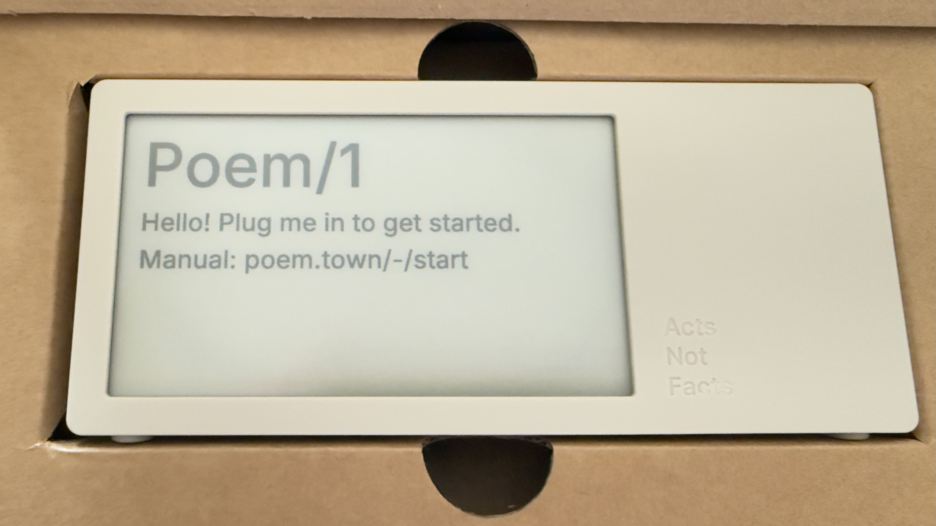
Poem clock in the box

Most of all, this device is giving me a lot of enjoyment and, well, glee.

The Poem/1 Arrived

This poetry clock in the few hours I have had it running, with its e-ink display that updates every minute with a new poem for the time, which is / was generated by AI. Some of the poems are, well unique, and others are wonderful, but they can be favorited with the one button on the device.

The one button does a lot of work. It can be used to favorite a poem. There is a site with a dashboard for your device where you can push it notes you write to display, but to clear the note and get back to the clock you use the one button. There is a sleep mode with a screen saver and to clear that, you use the one button.

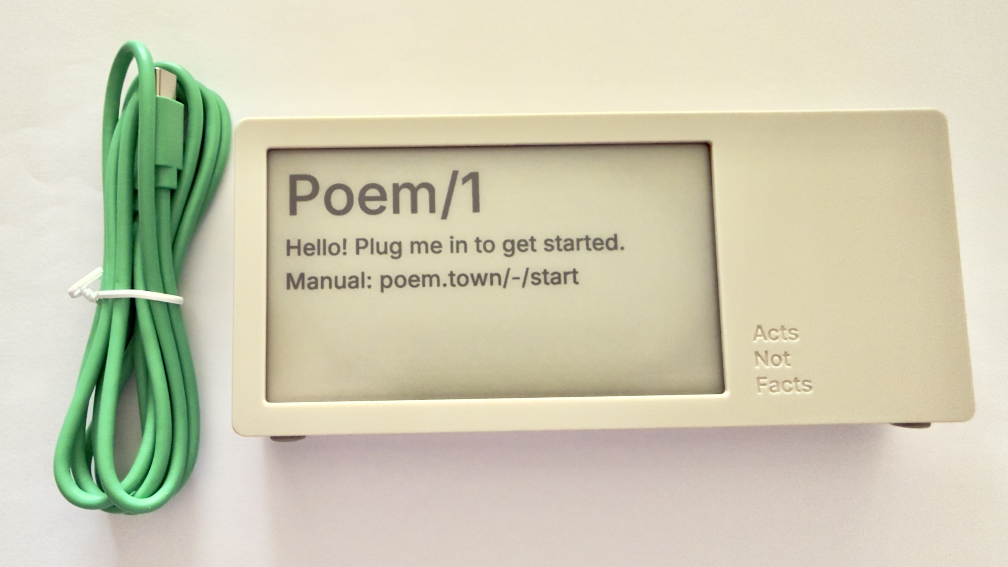
Poem clock and USB-C cable

The Poem/1 also has one USB-C cable. There is no manual in the box. Everything you need is the new Poem/1 device, the USB-C cable, and the e-ink screen tells you the rest.

After plugging it in you get a screen with some technical details and a QR code and using your phone with the QR code it then walks you through everything from easily connecting it to your WiFi (if printers could do this…), then make a selection or two and you have poetry time. There is also a dashboard website and the setup to your device is incredibly easy as is the setting up the account on that site.

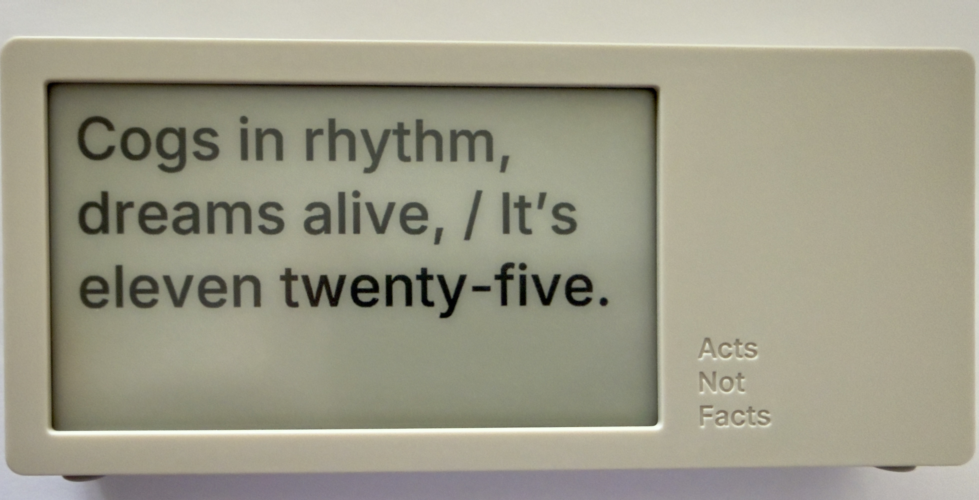
photo of poem clock displaying Cogs in rhythm, dreams alife, It's Eleven twentry-five.'

The Journey of Poem/1

About 3 years ago Matt Webb blogged about an idea he had about an AI poetry clock, My new job is AI sommelier and I detect the bouquet of progress (Interconnected). This soon got connected to an e-ink device and Matt was on his way.

Matt setup a Kickstarter, which I happily backed. It wasn’t that I was overly keen with the AI bits (I’ve been working with AI/ML going back to 2008 and stayed current and it is a thing that I treated, like most everything else, as a tool). But I enjoyed the process of little printer – BERG and its outcome from afar. Having watched Little Printer’s journey of toil to come to life from Berg London (Matt and the amazing folks there), I wanted to support Matt (who mostly did this Poem/1 project alone). This provided insite into his long journey of quickly getting to a working prototype, then the slog of finding viable parts, a manufacturer, various regulatory approvals, and iterations when due to various things there were changes made late mid-stream to add to the delays.

Matt has done a good job logging his slog and journey. There were times where I’d realized I’d forgotten about Poem/1 and not heard of any progress in a while. About that time Matt would have an update in Kickstarter or on his blog.

Then there was US Customs, which stalled things for a while (not the tariffs, which became a hurdle earlier), but there there was more paperwork needed around “what is this clock”, oddly I (the customer) was sent the forms and I knew there wasn’t a winding mechanism nor jewels in it (well I haven’t checked inside, but pretty sure there are no jewels). Matt did a great job documenting the US Customs documentation hurdle in his post, How global logistics got me over my fear of personal agents (Interconnected) (my having worked at a Custom’s Brokerage for a few years I know the many reasons brokerages are needed).

What Time Is It?

I love the ability to favorite a time. (What is your favorite time?) In a few hours I have a couple favorites that I quite like:

Puddles reflect lost skies, / At two forty-five, heart sighs.

At twelve fifty, shadows creep, / Secrets held within silence deep.

Willow branches gently sway, / It’s twelve twenty-five today.

Thank you Matt I now have favorite times and a wonderful product.


22 February 2011

The Genius of Design - BBC Series Overview

This past Summer (2010) the BBC (BBC 2) showed a five part documentary series on design, called The Genius of Design (TGoD). This series is similar to Gary Hustwit's Objectified, but TGoD goes much broader and deeper offering a better reflection of the reality of design only seen through that depth. Think of Objectified as a taste sampler of TGoD. There are some people in common between the two whom are interviewed and focussed upon, but life is breathed into architecture, process, visual, industrial, and many more slices of the design world that bring design to life in TGoD. It is a wonderful look at the real nature of design.

The Five Episodes of The Genius of Design

The five episodes are: 1) Ghosts in the Machine; 2) Designs for Living; 3) Blueprints for War; 4) Better Living Through Chemistry; 5) Objects of Desire. The core focus is on the deep consideration and understanding that goes into design. It is this rigor of understanding and working through to final product all based on a core objective. Throughout the five series the focus on a deep understanding the materials deeply, use, impact on the people interacting with what has been designed, and development processes (as well as optimizing them).

Standout Themes

The obsession to understand the materials used and objects being design with depth and breadth is not the only standout theme. Many other themes and take away ideas stood out not only when watching, but also now many months later.

Focus on End Use and People Using Product of Design

One major reoccurring theme throughout is the focus on end use. The the products not only should be pleasing nearly (possibly to the point of being emotive), but they must also be usable, and do what it is intended to do very well. A continual focus on the person using what is designed is one of the central tenets of design and with out this it is something other than design.

Breadth of Design Disciplines and Roles

To the point of design having a focus on the person using what is designed, the breath of roles within design was brought up. Wonderfully, Peter Boersma's T-Model was directly mentioned in when discussing the breadth of expertise with required depth and roles in design that are required to all come together to optimally create a final product that is please and usable for the person who engages with the final product. While watching the whole series the focus on various disciplines and roles is very evident and when listening to the designers talk about their own focus and discipline (all largely falling under the moniker of design) as it relates to final crafting of the final object) it is they all have depth in their own discipline, but understand the materials deeply and the class and required needs for the final product very well.

Every Designer Has A Chair In Them

Another reoccurring thread, that gets depth of focus a few times, is the idea that every designer has a chair in them (this has become a meme in the broad design community from the near instant this was uttered mid-Summer). The chair is emblematic of the need for utility (purpose, comfort, durability, etc.) as well as providing style. A chair that collapses is not well designed. The chair also often has requirements beyond basic sitting, which can include long term comfort, ability to stack and store it, be environmentally friendly, and many more possible variations. This intersection of use, style, material, and production around the chair leads to a lot of the depth of understanding required to get to a final product prototyped, tested, and into production. This depth and breadth that designers put in is often not considered by people outside the design community, but also the depth and rigor involved in design is missed in some disciplines that are tangential to design, but do not consider themselves purely in the design profession.

Process Design and Optimization

Within the Blueprints for War episode the focus of designing the process was often repeated. The episode focussed on Britain in World War II and the need to have mass production of goods needed for the war that worked for their purposes, but there were limitations of materials and time needed to get mass amounts of goods in military personnel�s hands. Streamlining production and simplifying the goods became essential, but as well thinking of solutions seemed like their was expansive production (dummy planes, etc.) and alternate facilities (fake factories) were included in the design mix.

Wishing for More

In all this was a fantastic series for those in and around the design profession, those who intersect with design, and just fans of design.


This work is licensed under the Creative Commons Attribution-NonCommercial-ShareAlike License.